

Business Process Improvement Through Software

Dive into the details to discover how aACE can help your business.

aACE software blog -  a complete resource for SMBs looking to improve their business processes. Read our articles on all things CRM, Accounting Software, ERP, Inventory Management & more

Business Process Improvement Through Software!

All things CRM, Accounting Software, ERP, Inventory Management & more

Read more about Automate Your Essential Workflows with aACE Task Groups

Automate Your Essential Workflows with aACE Task Groups

A Day in the Life

aACME Education Solutions refurbishes electronic whiteboards for use in schools and college classrooms. Because these whiteboards aren’t being sold new, each one goes through rigorous repairs and inspections—and it’s vital that each step is followed to the letter. That’s where aACE’s Task Groups module come in.

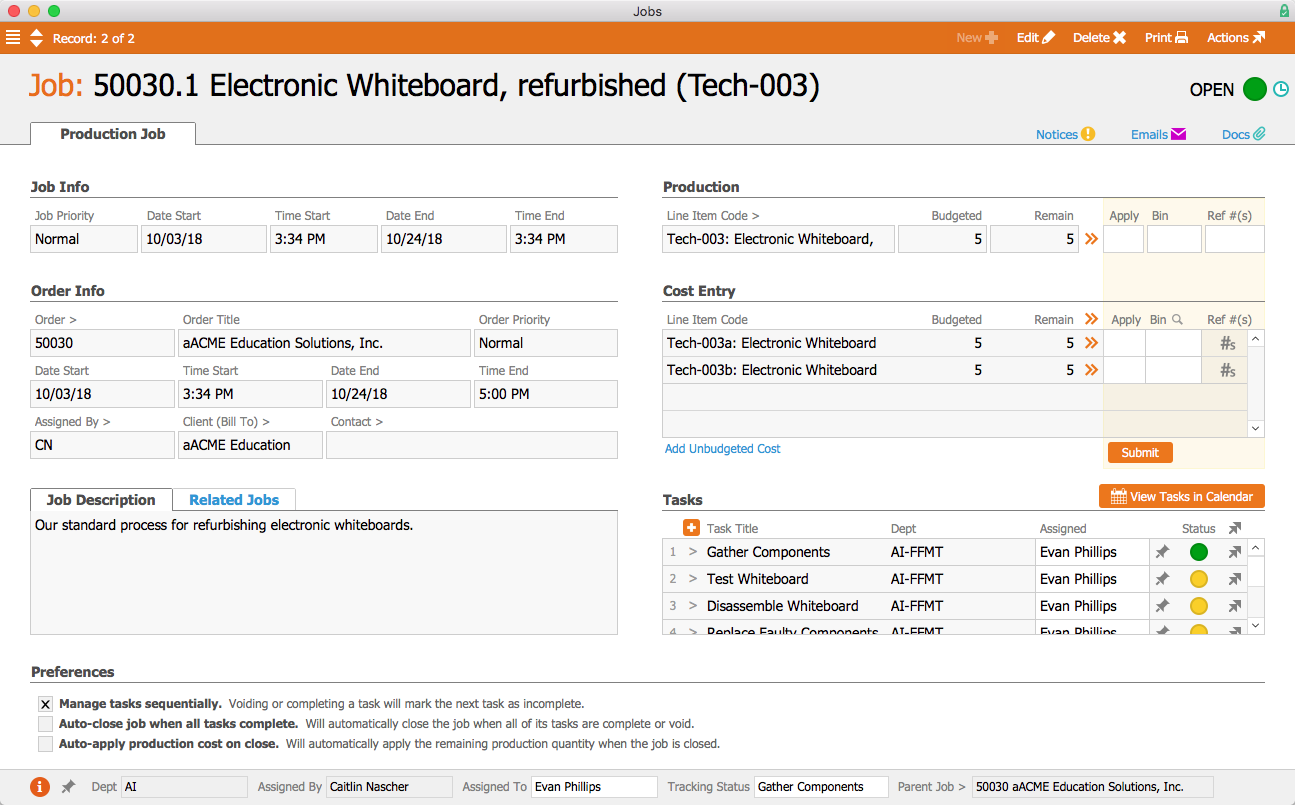
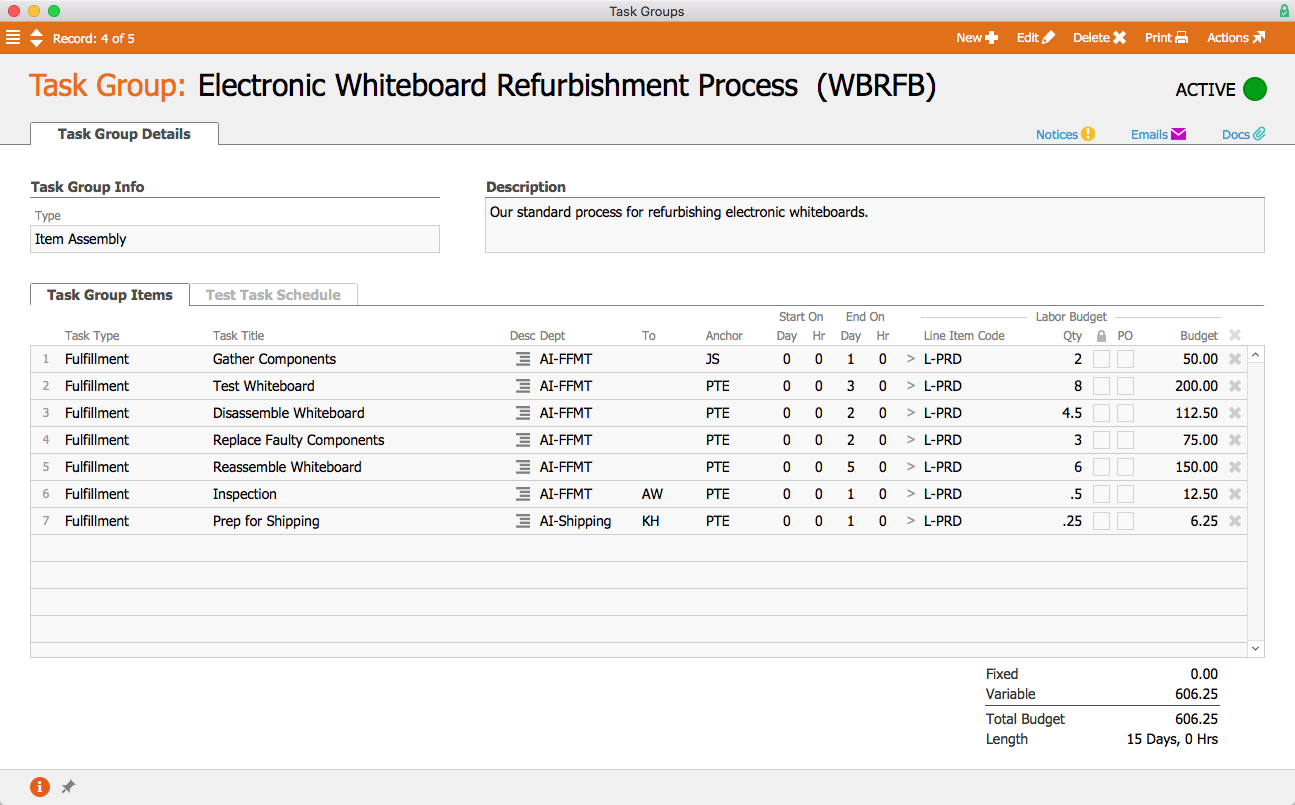
When a production order for the refurbished whiteboards is opened, aACE automatically generates a job associated with the order. Because the “Electronic Whiteboard Refurbishment Process” task group has been linked to the Refurbished Electronic Whiteboard line item code, the job is automatically populated with a pre-set list of tasks as specified in the task group.
 

Jobs


The first task, Gather Components, is configured to begin as soon as the job is opened. Tasks can be assigned to either a department or a specific user; because this task has been assigned to the Fulfillment Department, aACME’s Fulfillment Manager Evan Phillips is automatically assigned to the task. On the production floor, Evan can apply time and materials to the task using the aACE Job Shop app. In the task group, we can see that this first task is set to end one business day after the job starts. Two hours of labor have been budgeted for this task, and it has been assigned the line item code L-PRODUCTION. That is the line item code to which Evan’s time will be applied when he works on this task. When Evan marks the task complete, the next task, Test Whiteboard, will automatically begin.
 

Task Group


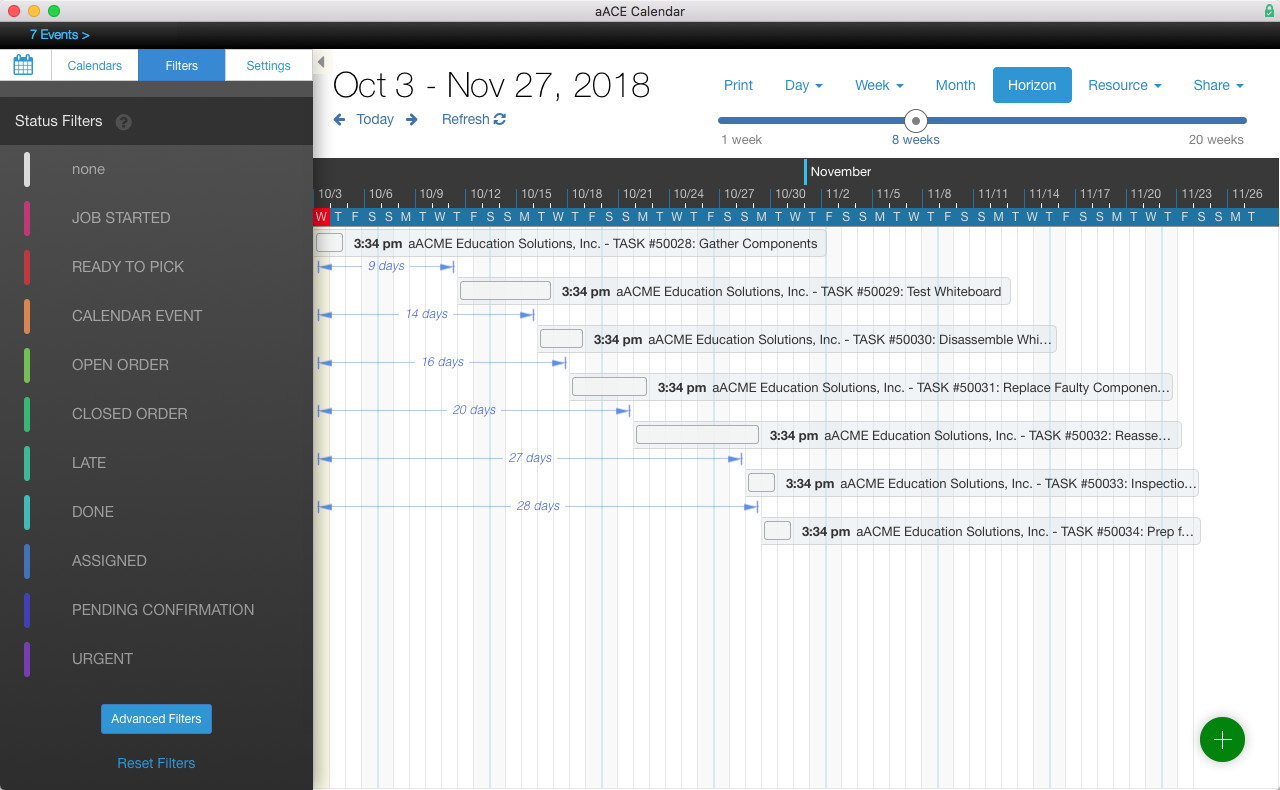
In the aACE+ DayBack calendar, we can see that all of the tasks associated with the job have been scheduled according to the amount of time they were allotted in the task group. But what if troubleshooting the whiteboards takes longer than expected? aACE’s anchoring features make rescheduling a snap. Because each task is set to begin only when the task before it has been completed, moving the Test Whiteboard task up a week will also move all of the tasks after it by the same amount of time.
 

Calendar-1


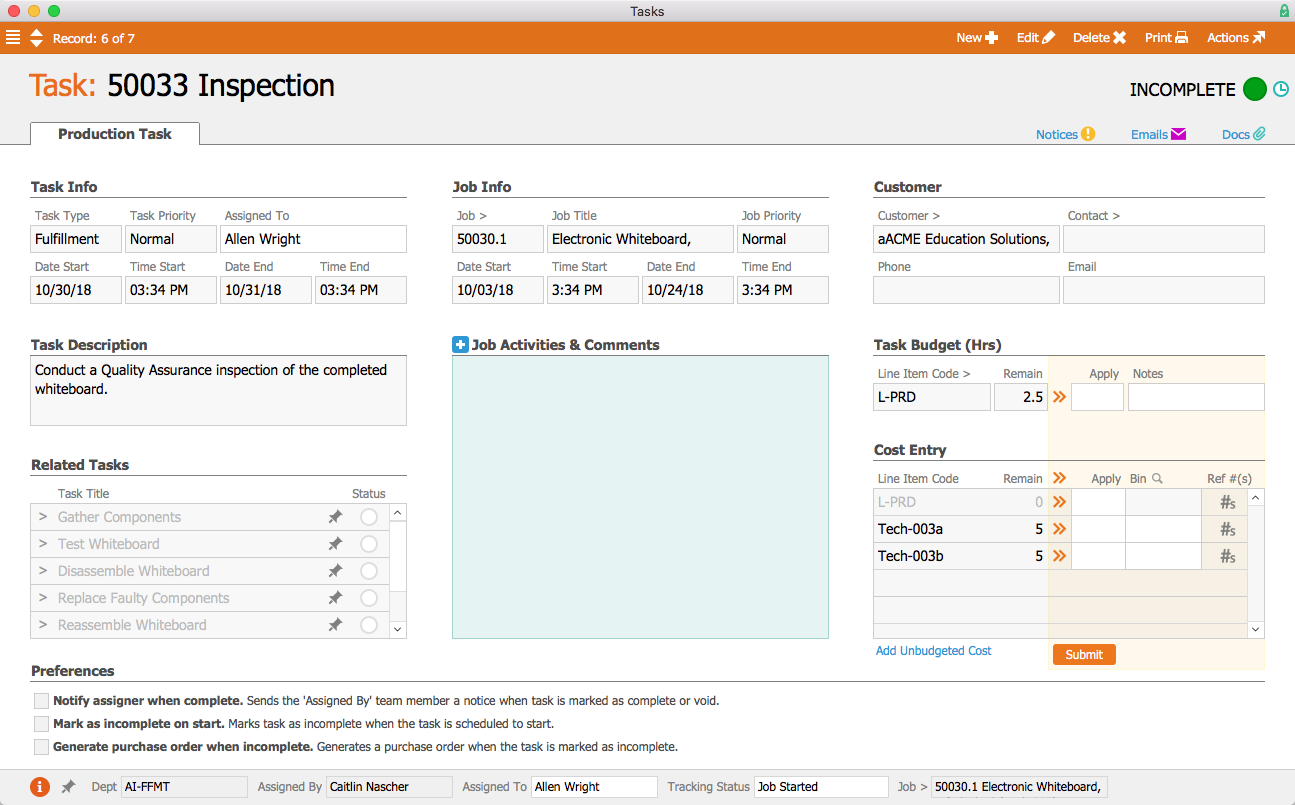
When the production team has finished the whiteboards, they need to be inspected. This task has been assigned to Allen Wright, aACME’s Quality Control Officer; when he’s ready to begin, the task will appear in his Tasks module with a green status indicator. In the task’s detail view he can view related tasks as well as apply time and materials to the task. He can also leave comments and activity notes that will appear in all task records associated with the job.
 

Task


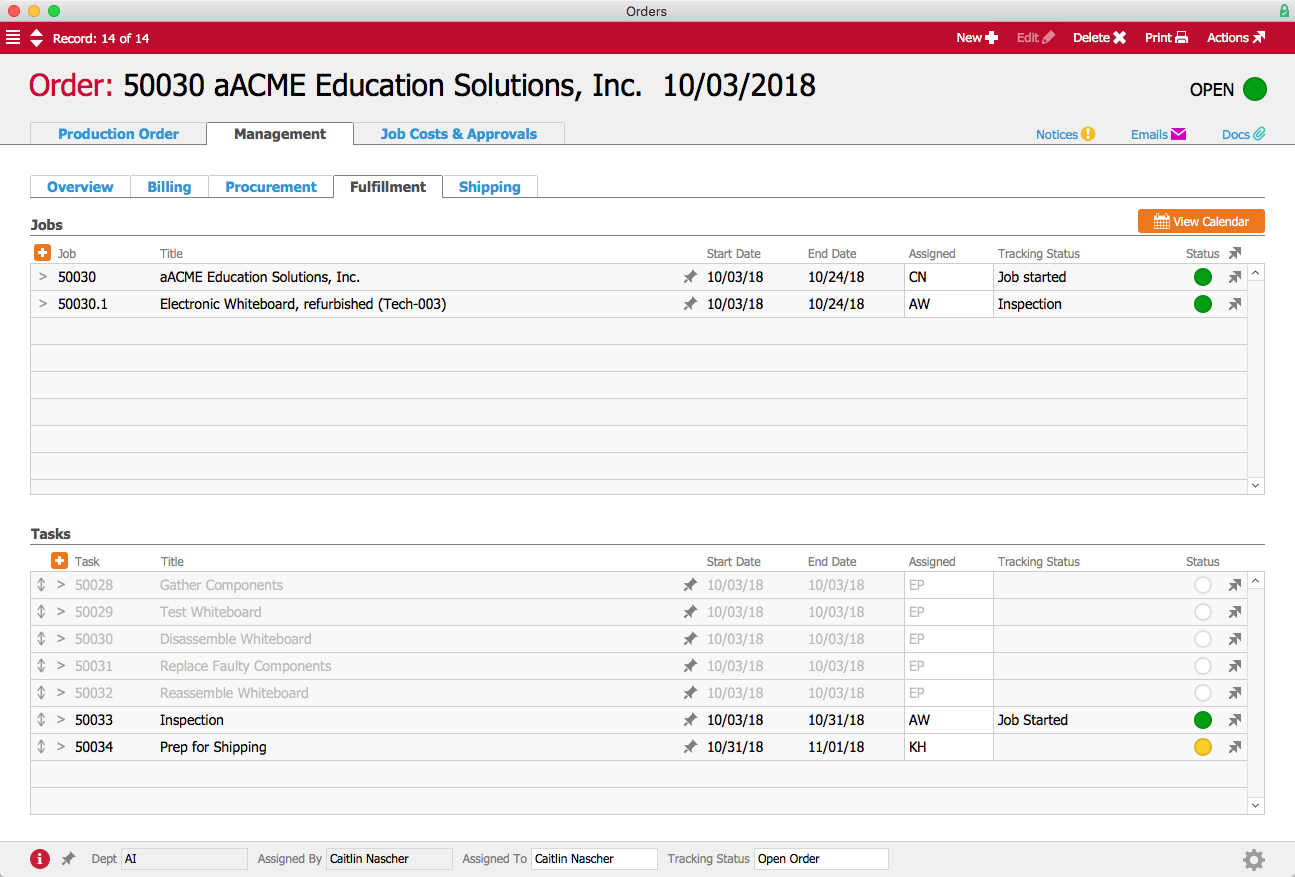
If the manager who placed the order wants to check in on how it’s progressing, the order’s Fulfillment tab shows which tasks have been completed, which tasks are in progress, which have yet to start, and when they are all scheduled to begin and end. Gone are the days of following up with other departments to find out when a job is going to be done—aACE provides all of that information at a glance!
 

Order


Now that we’ve seen how aACE’s Task Groups work for our fictional company, take a look at our Gable success story to learn more about how this feature has helped a real aACE client better track their orders. Discover even more ways that aACE works for everyday businesses when you check out our other success stories below.

"aACE transformed our order fulfillment process during implementation by helping us see trouble spots in our processes."
- Derek Navratil, IT Administrator, Essential Water Solutions

Learn More

In every business there are processes that must be carried out the same way each and every time. aACE Task Groups allow you to create templates for your standard workflows, helping to ensure that your operations run smoothly and according to schedule. And if one step in your process is delayed,... Learn More

-->

In every business there are processes that must be carried out the same way each and every time. aACE Task Groups allow you to create templates for your standard workflows, helping to ensure that your operations run smoothly and according to schedule. And if one step in your process is delayed, aACE’s Task Anchoring feature automatically shifts the rest of the tasks to accommodate your new timeline. To learn more about Task Groups, let’s take a look at how our fictional company, aACME Education Solutions, uses them in their day-to-day business.

A Day in the Life

aACME Education Solutions refurbishes electronic whiteboards for use in schools and college classrooms. Because these whiteboards aren’t being sold new, each one goes through rigorous repairs and inspections—and it’s vital that each step is followed to the letter. That’s where aACE’s Task Groups module come in.

When a production order for the refurbished whiteboards is opened, aACE automatically generates a job associated with the order. Because the “Electronic Whiteboard Refurbishment Process” task group has been linked to the Refurbished Electronic Whiteboard line item code, the job is automatically populated with a pre-set list of tasks as specified in the task group.


Jobs


The first task, Gather Components, is configured to begin as soon as the job is opened. Tasks can be assigned to either a department or a specific user; because this task has been assigned to the Fulfillment Department, aACME’s Fulfillment Manager Evan Phillips is automatically assigned to the task. On the production floor, Evan can apply time and materials to the task using the aACE Job Shop app. In the task group, we can see that this first task is set to end one business day after the job starts. Two hours of labor have been budgeted for this task, and it has been assigned the line item code L-PRODUCTION. That is the line item code to which Evan’s time will be applied when he works on this task. When Evan marks the task complete, the next task, Test Whiteboard, will automatically begin.


Task Group


In the aACE+ DayBack calendar, we can see that all of the tasks associated with the job have been scheduled according to the amount of time they were allotted in the task group. But what if troubleshooting the whiteboards takes longer than expected? aACE’s anchoring features make rescheduling a snap. Because each task is set to begin only when the task before it has been completed, moving the Test Whiteboard task up a week will also move all of the tasks after it by the same amount of time.


Calendar-1


When the production team has finished the whiteboards, they need to be inspected. This task has been assigned to Allen Wright, aACME’s Quality Control Officer; when he’s ready to begin, the task will appear in his Tasks module with a green status indicator. In the task’s detail view he can view related tasks as well as apply time and materials to the task. He can also leave comments and activity notes that will appear in all task records associated with the job.


Task


If the manager who placed the order wants to check in on how it’s progressing, the order’s Fulfillment tab shows which tasks have been completed, which tasks are in progress, which have yet to start, and when they are all scheduled to begin and end. Gone are the days of following up with other departments to find out when a job is going to be done—aACE provides all of that information at a glance!


Order


Now that we’ve seen how aACE’s Task Groups work for our fictional company, take a look at our Gable success story to learn more about how this feature has helped a real aACE client better track their orders. Discover even more ways that aACE works for everyday businesses when you check out our other success stories below.

"aACE transformed our order fulfillment process during implementation by helping us see trouble spots in our processes."
- Derek Navratil, IT Administrator, Essential Water Solutions
Learn More

Read more about Always Know Who Did What and When with aACE’s Advanced Logging Features

Always Know Who Did What and When with aACE’s Advanced Logging Features

A Day in the Life

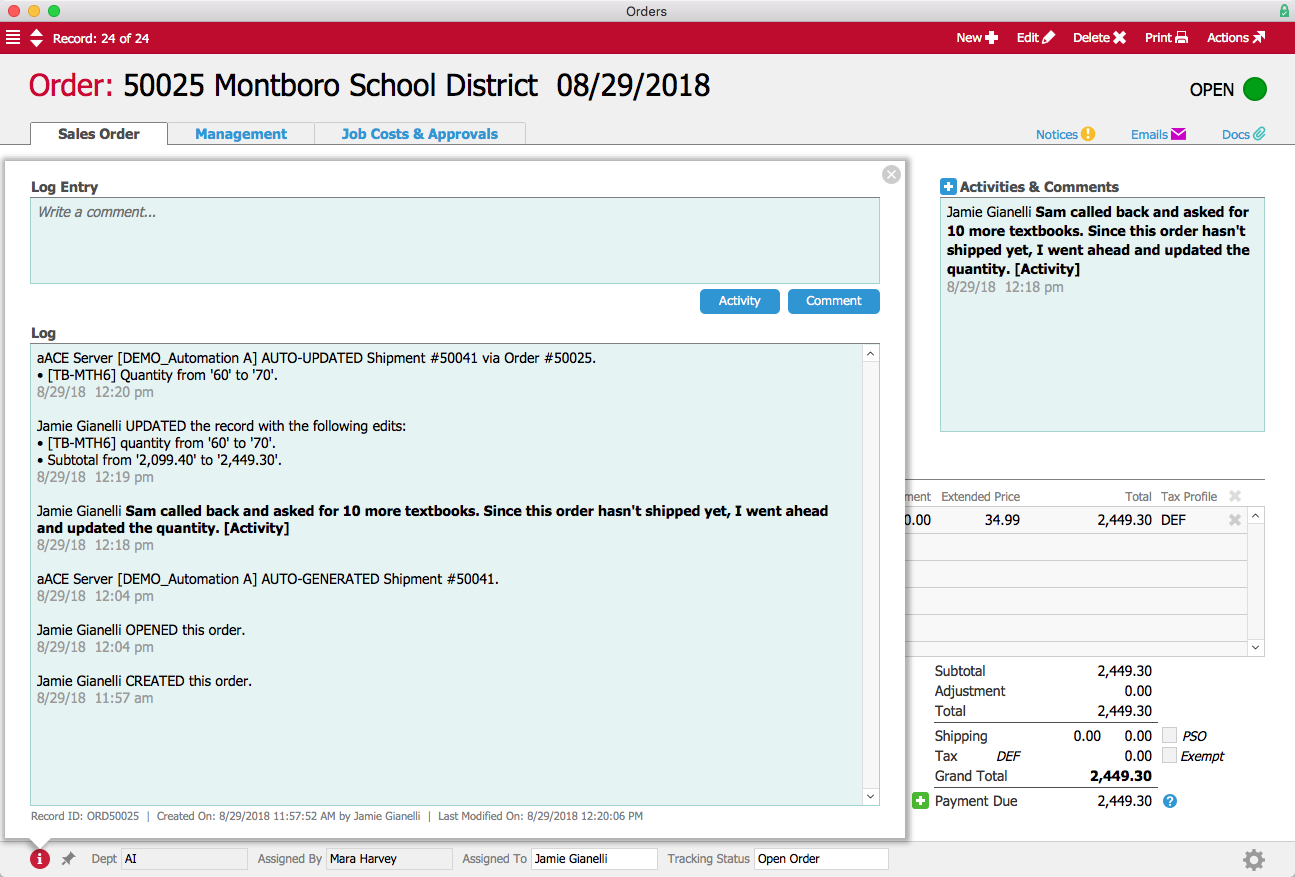
Sales rep Jamie Gianelli enters an order for 60 math textbooks placed by Sam Patel for the Montboro School District. When Sam calls back later to add an additional 10 textbooks, Jamie updates the order’s quantity and enters a note in the Activities field to document the reason for the change. The order record’s log captures both the change Jamie made and her comment explaining it, so it can easily be seen by anyone with access to the order.

Order Log


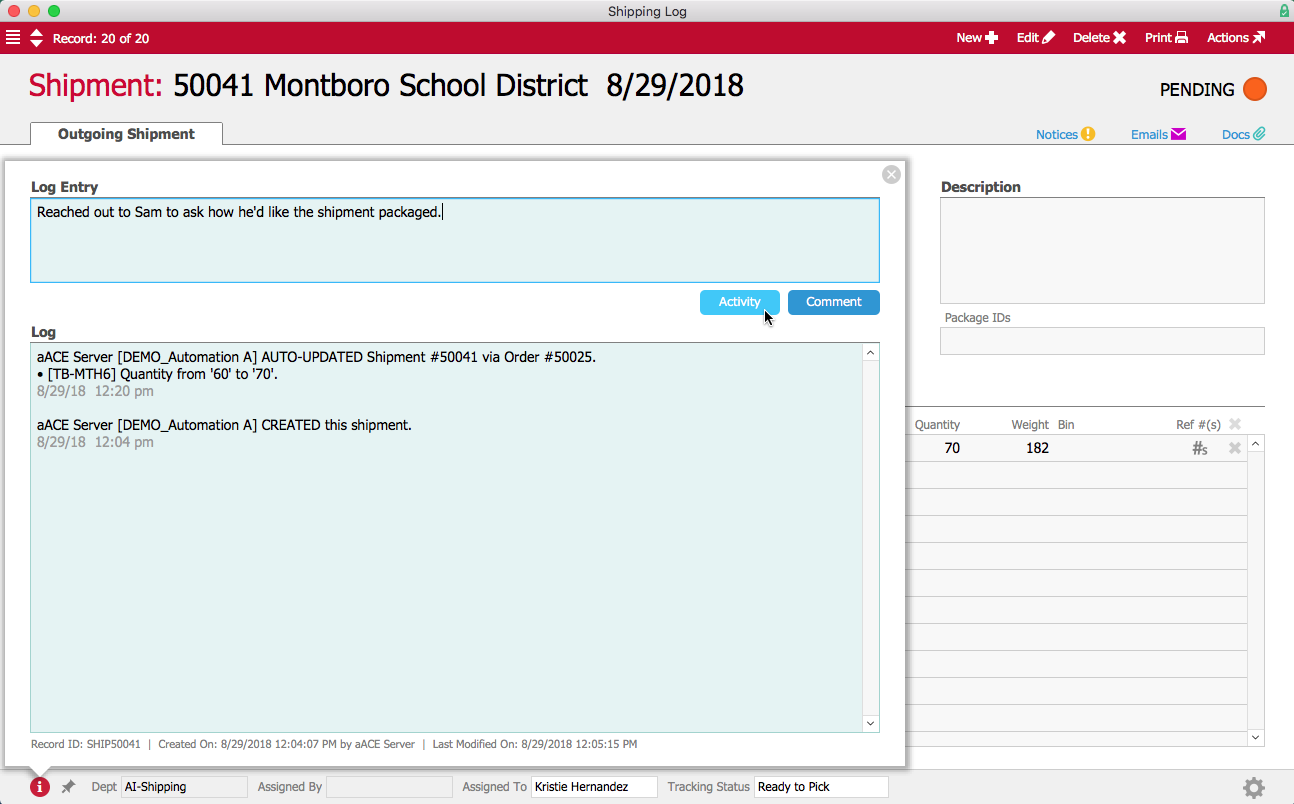
When Jamie updates the quantity of textbooks in the order record, aACE automatically updates the quantity in the associated shipment record. In the warehouse, Kristie Hernandez can see when the change was made and by whom in the shipment record’s log. If Kristie needs to contact Sam with a question, she can add that interaction in the log.

Shipment Log-1


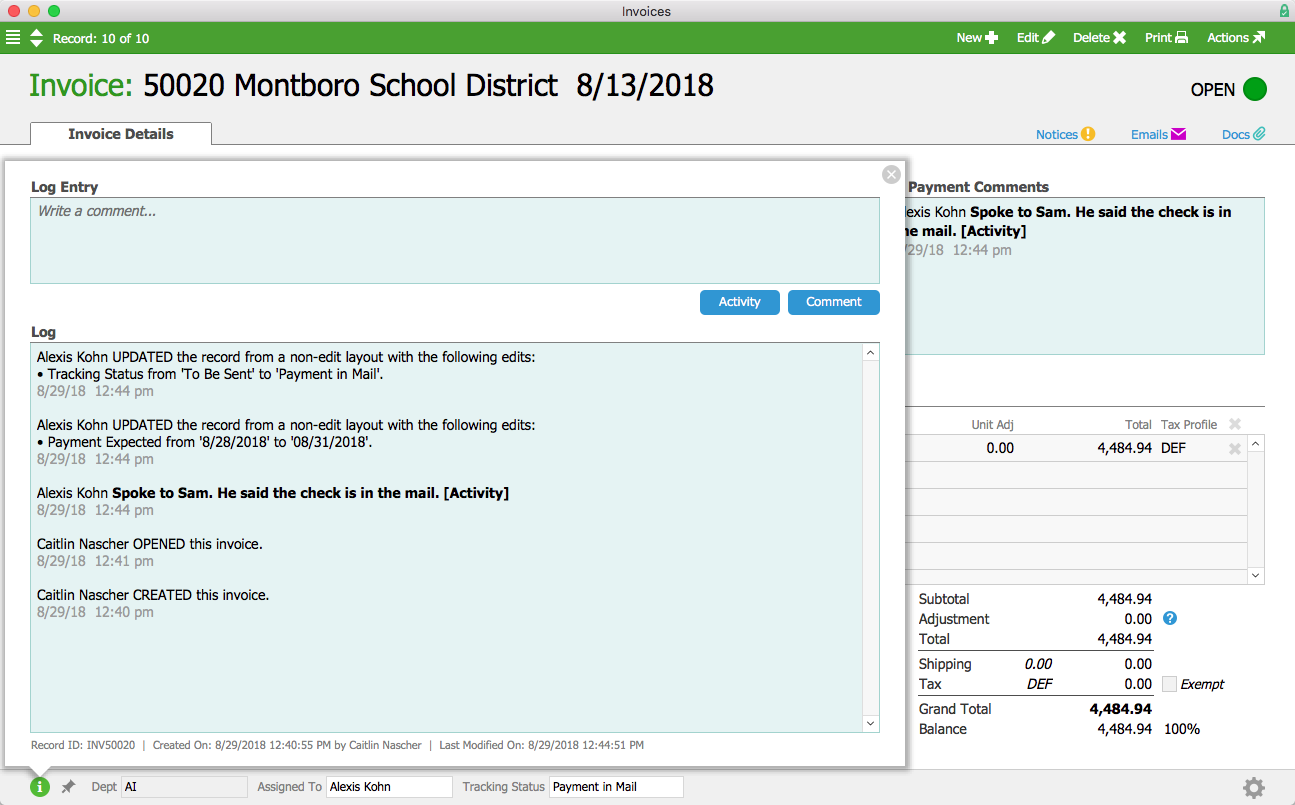
Over in the A/R department, Alexis Kohn looks through open invoices and spots one from the Montboro School District that’s past due. She gets in touch with Sam and learns that the check had been sent out that morning. Alexis changes the invoice’s tracking status to “Payment In Mail” with an expected payment date a few days ahead and a comment noting her conversation with Sam. These changes are captured in the log, so when her supervisor notices that the invoice is marked as current despite being past the due date, he can easily find the explanation.

Invoice Log


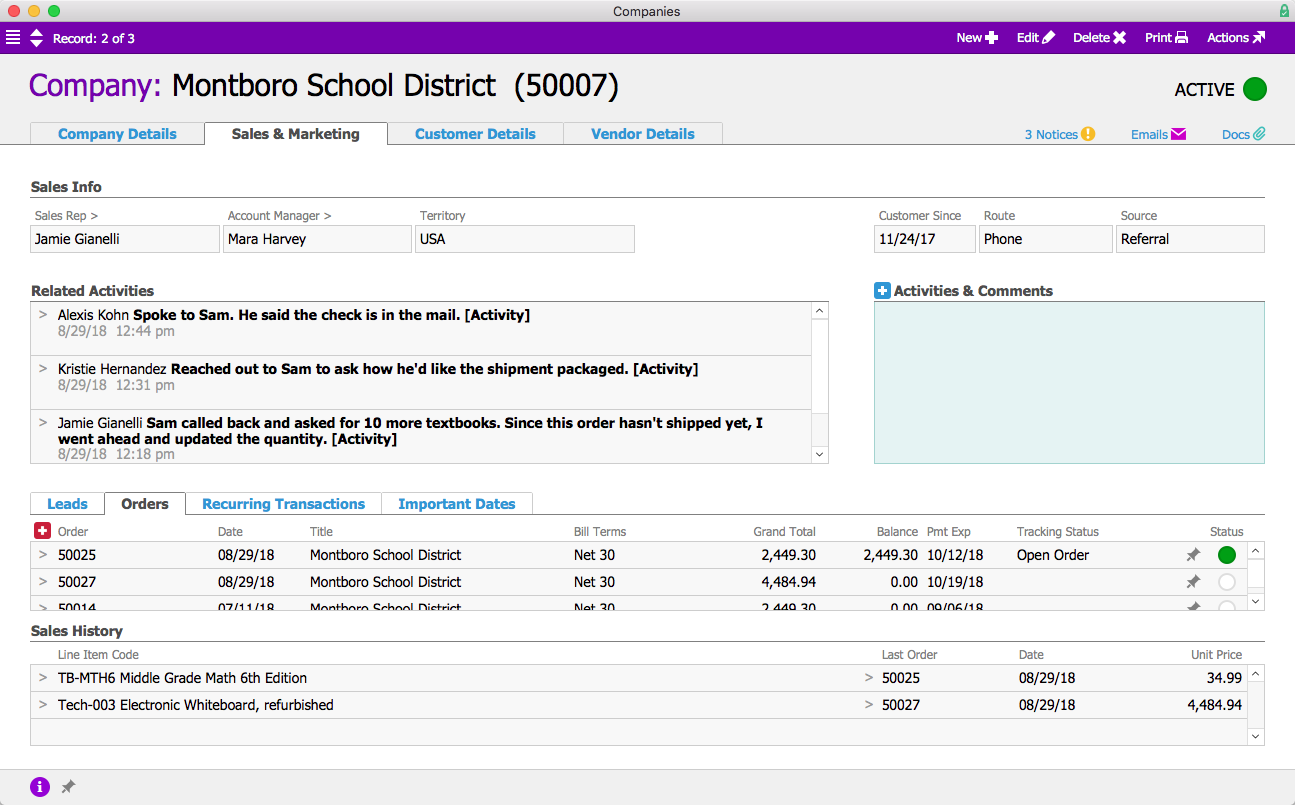
All of these activities have also been captured in the Montboro School District’s Company record, allowing Mara Harvey, the account manager, to keep track of interactions between Sam and various members of the aACME team. Each activity in the log links back to the record where it originated, allowing Mara to quickly view the source of an activity with one click.

Company Activities


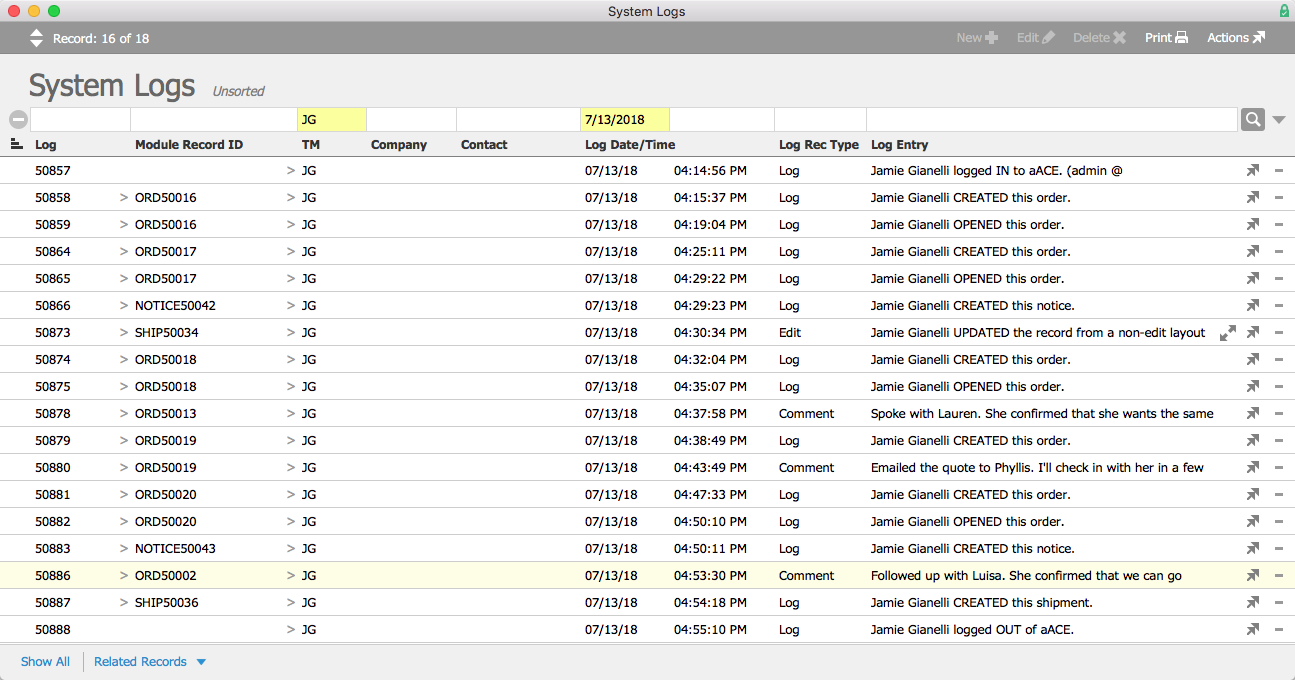
But what if senior management needs to review everything a user has done in the system, not just their activity within one record? aACE’s System Logs module allows system administrators to view what a particular team member has been doing in the system across a given period of time, with links to the related records. This allows administrators to find records when users swear they completed a task but their managers aren’t sure it was done. It also gives HR managers the ability to review a user’s activity more broadly.

Let’s say Jamie's supervisor has a question about what she was doing on July 13th. Jamie says that she took several orders that day, and spoke to multiple clients. But her supervisor doesn’t recall that happening. They turn to their aACE system administrator to clear things up. With one quick search, they can view the logs Jamie generated that day, including links to the relevant records.

System Logs


Now that we’ve seen how aACE’s advanced logging works for our fictional company, take a look at our American Christmas success story to learn more about how this feature helped a real aACE client increase visibility throughout their business and cut their internal follow-up time by over 50%. Discover even more ways that aACE works for everyday businesses when you check out our other success stories below.

"One of my personal favorite features is the Data Log. With this feature, our team members can now see a complete account of the history of a transaction as it moves through our system. Not only does this provide us with visibility that we had never had before, but I'm pleased to say we have also greatly benefited from the increased accountability that comes with logging that all of our users have access to. And accountability, for us, has meant more consistent adoption of the processes that are important to the success of our organization." ~ Andrew J. Porter, ERP Manager, Gable
Learn More

aACE’s advanced logging features promote visibility and accountability by tracking key changes made to records, providing a clear audit trail, and ensuring you always know who did what and when. To learn more about these features, let’s look at how fictional company aACME Education Solutions... Learn More

-->

aACE’s advanced logging features promote visibility and accountability by tracking key changes made to records, providing a clear audit trail, and ensuring you always know who did what and when. To learn more about these features, let’s look at how fictional company aACME Education Solutions uses them in their day-to-day operations.

A Day in the Life

Sales rep Jamie Gianelli enters an order for 60 math textbooks placed by Sam Patel for the Montboro School District. When Sam calls back later to add an additional 10 textbooks, Jamie updates the order’s quantity and enters a note in the Activities field to document the reason for the change. The order record’s log captures both the change Jamie made and her comment explaining it, so it can easily be seen by anyone with access to the order.

Order Log


When Jamie updates the quantity of textbooks in the order record, aACE automatically updates the quantity in the associated shipment record. In the warehouse, Kristie Hernandez can see when the change was made and by whom in the shipment record’s log. If Kristie needs to contact Sam with a question, she can add that interaction in the log.

Shipment Log-1


Over in the A/R department, Alexis Kohn looks through open invoices and spots one from the Montboro School District that’s past due. She gets in touch with Sam and learns that the check had been sent out that morning. Alexis changes the invoice’s tracking status to “Payment In Mail” with an expected payment date a few days ahead and a comment noting her conversation with Sam. These changes are captured in the log, so when her supervisor notices that the invoice is marked as current despite being past the due date, he can easily find the explanation.

Invoice Log


All of these activities have also been captured in the Montboro School District’s Company record, allowing Mara Harvey, the account manager, to keep track of interactions between Sam and various members of the aACME team. Each activity in the log links back to the record where it originated, allowing Mara to quickly view the source of an activity with one click.

Company Activities


But what if senior management needs to review everything a user has done in the system, not just their activity within one record? aACE’s System Logs module allows system administrators to view what a particular team member has been doing in the system across a given period of time, with links to the related records. This allows administrators to find records when users swear they completed a task but their managers aren’t sure it was done. It also gives HR managers the ability to review a user’s activity more broadly.

Let’s say Jamie's supervisor has a question about what she was doing on July 13th. Jamie says that she took several orders that day, and spoke to multiple clients. But her supervisor doesn’t recall that happening. They turn to their aACE system administrator to clear things up. With one quick search, they can view the logs Jamie generated that day, including links to the relevant records.

System Logs


Now that we’ve seen how aACE’s advanced logging works for our fictional company, take a look at our American Christmas success story to learn more about how this feature helped a real aACE client increase visibility throughout their business and cut their internal follow-up time by over 50%. Discover even more ways that aACE works for everyday businesses when you check out our other success stories below.

"One of my personal favorite features is the Data Log. With this feature, our team members can now see a complete account of the history of a transaction as it moves through our system. Not only does this provide us with visibility that we had never had before, but I'm pleased to say we have also greatly benefited from the increased accountability that comes with logging that all of our users have access to. And accountability, for us, has meant more consistent adoption of the processes that are important to the success of our organization." ~ Andrew J. Porter, ERP Manager, Gable
Learn More

Read more about Save Time, Improve Accuracy in Time and Materials Tracking With aACE Job Shop App

Save Time, Improve Accuracy in Time and Materials Tracking With aACE Job Shop App

With the aACE Job Shop app, there's a better way.

The aACE Job Shop app is a mobile app that can be deployed on shared iPads. It allows your production staff to quickly log in and record time or apply materials to a job. Information from the app is passed back to aACE automatically, allowing aACE users in the office to stay apprised of what’s happening on the production floor.

Let’s take a look at how it works:

Now that we’ve seen the Job Shop app in action, let’s see how the fictional company aACME Education Solutions uses it in their day-to-day operations.

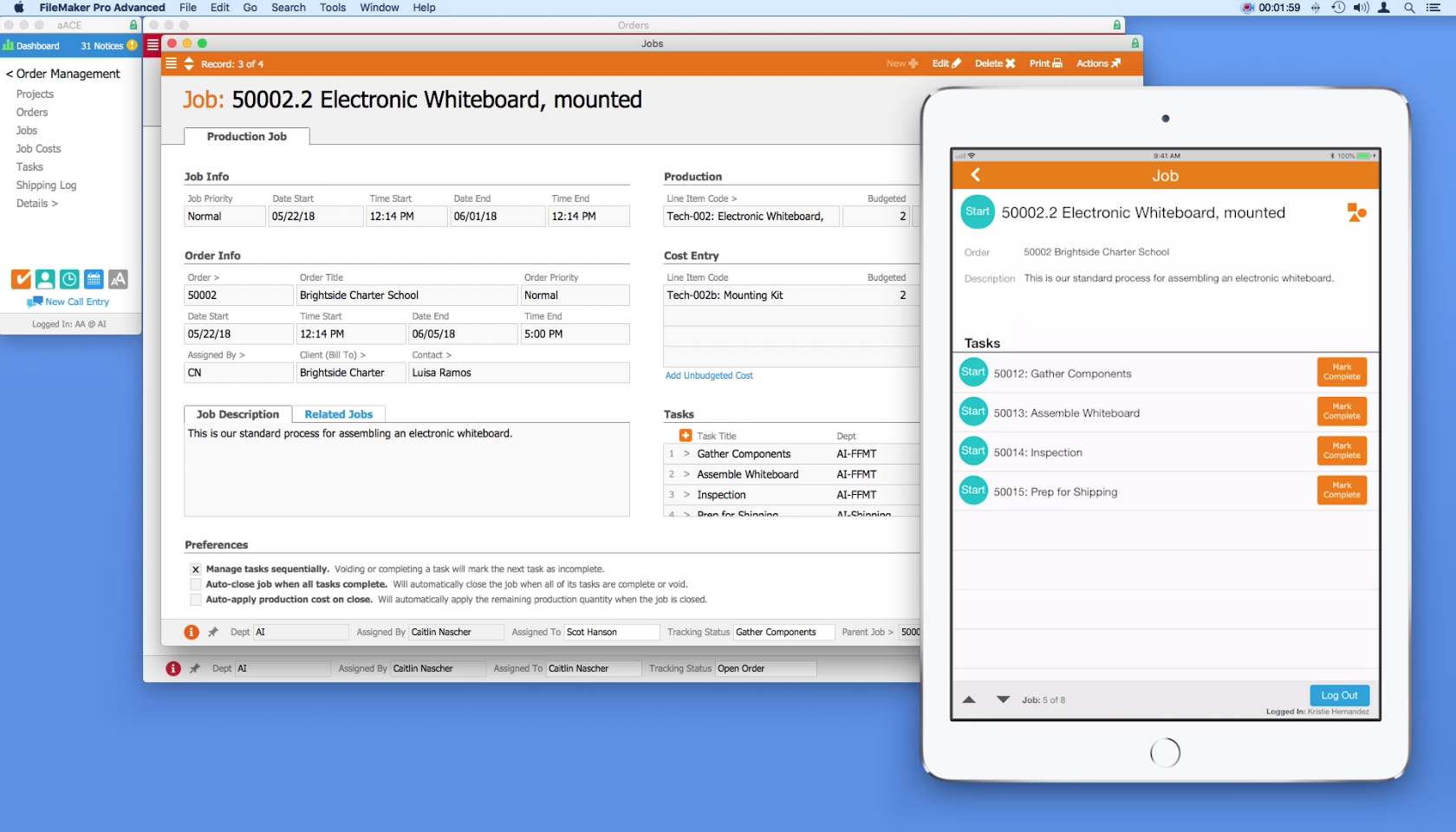
aACME customer Brightside Charter School orders two mounted whiteboards for their classrooms. The whiteboards need to be assembled before they can be shipped. When the order is opened, aACE automatically generates a job record for the assembly. Inside the job are a series of tasks and a bill of materials.

On the production floor, aACME employee Evan Phillips is ready to work. He goes to any of the shared iPads mounted on the wall throughout the site and logs into the Job Shop app by entering his unique PIN. From a list of open jobs, he chooses the Brightside Charter School whiteboard assembly. In the job’s detail view, Evan can see the order associated with the job, a description of the job, and a list of tasks that make up the job. To start a task, he simply taps that task’s Start button. The app then logs him out automatically, clearing the way for the next employee to log in.

The first task in the whiteboard assembly job is to gather materials. When Evan has finished collecting the components needed for the whiteboard, he logs back into the app. To enter the parts in the job record, he taps the Apply Materials icon. Using a barcode scanner connected to the iPad, he quickly scans in each of the required materials. The Job Shop app pushes that information back to the central aACE solution, automatically updating the job record with the materials applied.

After Evan is finished with a task, he logs in and taps the Mark Complete button. The task is also marked complete in aACE. Now he can see that the next task, Assemble Whiteboard, is ready to start.

Back in the office, Account Manager Mara Harvey gets a call from her contact at Brightside Charter School asking for a status update on the whiteboards. With just a few clicks, Mara can see that the job has been started, the materials have been applied, and assembly is currently underway.

At the end of the day, Evan submits his time by logging into the app and tapping the Timesheet button. Here he can review a list of all of the tasks he worked on today and how much time he spent on each task. He notices a mistake though – he forgot to pause a task while he went on his lunch break. The app allows Evan to record a note to his manager which will be sent along with the timesheet so that he can explain the discrepancy.

Evan’s manager can review the notes in aACE, adjust the timesheet, then approve it.

When the job is finished, the project manager can review the details in aACE, checking and approving the time and materials that were applied to the job.

The fully-integrated, easy-to-use Job Shop app allows managers to keep track of what their teams are doing throughout the day, while also giving employees the ability to track their progress without slowing down. To learn more about this app or find out what else aACE can do for your business, contact us today.

"Without much training, you can logically understand how this program fits into your work environment. The program is user friendly and easy enough for our whole staff, with varying levels of technical skills, to embrace." ~ Lili Hall, President, KNOCK Inc.
Learn More

Are your production staff recording time and material usage on paper, in Excel, or with software that doesn't "talk" to your business management solution? Is it somebody's job to manually key that data into your accounting system? With the aACE Job Shop app, there's a better way. The aACE Job Shop... Learn More

-->

Are your production staff recording time and material usage on paper, in Excel, or with software that doesn't "talk" to your business management solution? Is it somebody's job to manually key that data into your accounting system?

With the aACE Job Shop app, there's a better way.

The aACE Job Shop app is a mobile app that can be deployed on shared iPads. It allows your production staff to quickly log in and record time or apply materials to a job. Information from the app is passed back to aACE automatically, allowing aACE users in the office to stay apprised of what’s happening on the production floor.

Let’s take a look at how it works:

Now that we’ve seen the Job Shop app in action, let’s see how the fictional company aACME Education Solutions uses it in their day-to-day operations.

aACME customer Brightside Charter School orders two mounted whiteboards for their classrooms. The whiteboards need to be assembled before they can be shipped. When the order is opened, aACE automatically generates a job record for the assembly. Inside the job are a series of tasks and a bill of materials.

On the production floor, aACME employee Evan Phillips is ready to work. He goes to any of the shared iPads mounted on the wall throughout the site and logs into the Job Shop app by entering his unique PIN. From a list of open jobs, he chooses the Brightside Charter School whiteboard assembly. In the job’s detail view, Evan can see the order associated with the job, a description of the job, and a list of tasks that make up the job. To start a task, he simply taps that task’s Start button. The app then logs him out automatically, clearing the way for the next employee to log in.

The first task in the whiteboard assembly job is to gather materials. When Evan has finished collecting the components needed for the whiteboard, he logs back into the app. To enter the parts in the job record, he taps the Apply Materials icon. Using a barcode scanner connected to the iPad, he quickly scans in each of the required materials. The Job Shop app pushes that information back to the central aACE solution, automatically updating the job record with the materials applied.

After Evan is finished with a task, he logs in and taps the Mark Complete button. The task is also marked complete in aACE. Now he can see that the next task, Assemble Whiteboard, is ready to start.

Back in the office, Account Manager Mara Harvey gets a call from her contact at Brightside Charter School asking for a status update on the whiteboards. With just a few clicks, Mara can see that the job has been started, the materials have been applied, and assembly is currently underway.

At the end of the day, Evan submits his time by logging into the app and tapping the Timesheet button. Here he can review a list of all of the tasks he worked on today and how much time he spent on each task. He notices a mistake though – he forgot to pause a task while he went on his lunch break. The app allows Evan to record a note to his manager which will be sent along with the timesheet so that he can explain the discrepancy.

Evan’s manager can review the notes in aACE, adjust the timesheet, then approve it.

When the job is finished, the project manager can review the details in aACE, checking and approving the time and materials that were applied to the job.

The fully-integrated, easy-to-use Job Shop app allows managers to keep track of what their teams are doing throughout the day, while also giving employees the ability to track their progress without slowing down. To learn more about this app or find out what else aACE can do for your business, contact us today.

"Without much training, you can logically understand how this program fits into your work environment. The program is user friendly and easy enough for our whole staff, with varying levels of technical skills, to embrace." ~ Lili Hall, President, KNOCK Inc.
Learn More

Read more about Streamline Your Shipping Process with aACE+ ReadyCloud

Streamline Your Shipping Process with aACE+ ReadyCloud

With aACE, you can.

The aACE+ ReadyCloud ReadyShipper integration significantly reduces the need for manual data entry, a common source of delays and costly errors. Our automated shipping integration passes information seamlessly between the two solutions, so it's a breeze to get deliveries to your customers on time. And when you receive a bill from a courier, aACE also makes it easy to reconcile that statement with your existing records. Here’s how:


Now that we’ve seen the shipping integration in action, let’s look at how the fictional company aACME Education Solutions uses it in their day-to-day operations.

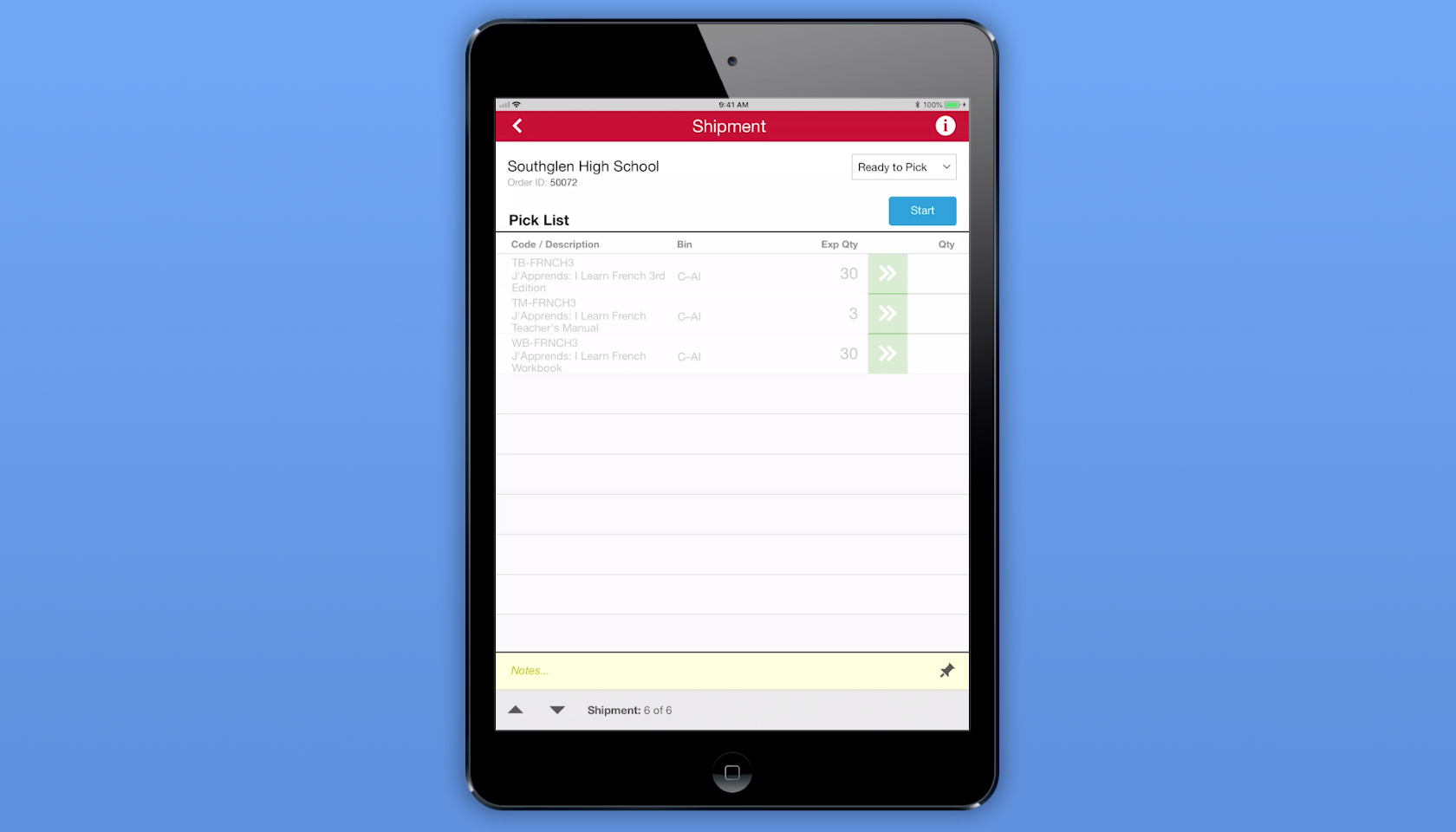
aACME customer Southglen High School places an order for 30 French textbooks, 3 of the corresponding teacher’s manuals, and 30 workbooks. As soon as the order is opened, aACE automatically generates a shipment with the tracking status Ready to Pick. The shipment is immediately passed to the aACE Pick app.

On the warehouse floor, aACME employee Ned Walker logs into the Pick app via a shared iPad. He chooses the Southglen High School shipment from a list of shipments that are ready to pick. In the shipment’s detail view, he sees each line item in the shipment, the bin where each line item is located, and the expected quantity of each item that he needs to pick. When Ned taps the Start button, the Pick app updates the shipment record’s tracking status to In Progress.

When Ned finishes picking the required textbooks, he enters the quantities of each item into the Pick app. When he’s finished with the shipment, he taps the Done button and the app updates the shipment’s tracking status to Ready to Transmit. From there, aACE automatically transmits the shipment to ReadyCloud.

Over in aACME’s Shipping Department, employee Kristie Hernandez packages the shipment. She then logs into ReadyCloud’s ReadyShipper terminal and schedules the packages for delivery. The shipment information is automatically pulled back into aACE, where the record is updated with cost and tracking information and the shipment’s tracking status is changed to Shipped. An invoice for the shipment is automatically generated — and all of this happens without Kristie ever needing to log into aACE.

Another source of frustration for companies like aACME is entering and reconciling courier bills. The aACE+ ReadyCloud integration makes this a snap. Drew Sanderson works in aACME’s Accounts Payable Department. Rather than manually entering the courier bill at the end of each month, Drew can see all of the shipments he hasn’t yet purchased at a glance with aACE’s Build Courier Invoice feature. With one click, Drew can organize each shipment, its costs, and its tracking information for easy line-by-line comparison with the courier’s statement.

What if the cost of a shipment on the courier’s bill doesn’t match the cost in aACE? For example, what if an address turned out to be residential instead of commercial? If Drew finds a discrepancy, he can easily adjust it in the purchase. That change automatically updates the shipment record, which in turn updates the order so the costs stay correct. To keep shipping costs in check, his aACE solution is configured to automatically send notifications to an oversight group if the difference between the courier’s bill and the shipment cost in aACE exceeds a certain value or percentage.

For a company like aACME with hundreds of shipments per day, this automation saves hours of labor and keeps the fulfillment process running smoothly. To learn more about this feature or find out what else aACE can do for your business, contact us today.

"The more we use this program, the more we love it! The biggest asset to our company has been the automated workflows, especially in our customer care and shipping departments. We have been able to reduce order entry errors and drastically improve our ship time from order entry to out-the-door. The shipping integration has helped reduce picking errors and assist in a speedy pick and pack process." - Daniel Chapman, Founder and CEO, Redd Remedies


Learn More

A key to success for any business is getting your customers what they want, when they want it. This means your fulfillment process is crucial. But as your company grows, you may find that shipping solutions that don’t talk to your ERP system are grinding your fulfillment process to a halt as... Learn More

-->

A key to success for any business is getting your customers what they want, when they want it. This means your fulfillment process is crucial. But as your company grows, you may find that shipping solutions that don’t talk to your ERP system are grinding your fulfillment process to a halt as employees manually copy information from one system to the other. Wouldn’t it be great if you could speed up your fulfillment process and improve accuracy?

With aACE, you can.

The aACE+ ReadyCloud ReadyShipper integration significantly reduces the need for manual data entry, a common source of delays and costly errors. Our automated shipping integration passes information seamlessly between the two solutions, so it's a breeze to get deliveries to your customers on time. And when you receive a bill from a courier, aACE also makes it easy to reconcile that statement with your existing records. Here’s how:


Now that we’ve seen the shipping integration in action, let’s look at how the fictional company aACME Education Solutions uses it in their day-to-day operations.

aACME customer Southglen High School places an order for 30 French textbooks, 3 of the corresponding teacher’s manuals, and 30 workbooks. As soon as the order is opened, aACE automatically generates a shipment with the tracking status Ready to Pick. The shipment is immediately passed to the aACE Pick app.

On the warehouse floor, aACME employee Ned Walker logs into the Pick app via a shared iPad. He chooses the Southglen High School shipment from a list of shipments that are ready to pick. In the shipment’s detail view, he sees each line item in the shipment, the bin where each line item is located, and the expected quantity of each item that he needs to pick. When Ned taps the Start button, the Pick app updates the shipment record’s tracking status to In Progress.

When Ned finishes picking the required textbooks, he enters the quantities of each item into the Pick app. When he’s finished with the shipment, he taps the Done button and the app updates the shipment’s tracking status to Ready to Transmit. From there, aACE automatically transmits the shipment to ReadyCloud.

Over in aACME’s Shipping Department, employee Kristie Hernandez packages the shipment. She then logs into ReadyCloud’s ReadyShipper terminal and schedules the packages for delivery. The shipment information is automatically pulled back into aACE, where the record is updated with cost and tracking information and the shipment’s tracking status is changed to Shipped. An invoice for the shipment is automatically generated — and all of this happens without Kristie ever needing to log into aACE.

Another source of frustration for companies like aACME is entering and reconciling courier bills. The aACE+ ReadyCloud integration makes this a snap. Drew Sanderson works in aACME’s Accounts Payable Department. Rather than manually entering the courier bill at the end of each month, Drew can see all of the shipments he hasn’t yet purchased at a glance with aACE’s Build Courier Invoice feature. With one click, Drew can organize each shipment, its costs, and its tracking information for easy line-by-line comparison with the courier’s statement.

What if the cost of a shipment on the courier’s bill doesn’t match the cost in aACE? For example, what if an address turned out to be residential instead of commercial? If Drew finds a discrepancy, he can easily adjust it in the purchase. That change automatically updates the shipment record, which in turn updates the order so the costs stay correct. To keep shipping costs in check, his aACE solution is configured to automatically send notifications to an oversight group if the difference between the courier’s bill and the shipment cost in aACE exceeds a certain value or percentage.

For a company like aACME with hundreds of shipments per day, this automation saves hours of labor and keeps the fulfillment process running smoothly. To learn more about this feature or find out what else aACE can do for your business, contact us today.

"The more we use this program, the more we love it! The biggest asset to our company has been the automated workflows, especially in our customer care and shipping departments. We have been able to reduce order entry errors and drastically improve our ship time from order entry to out-the-door. The shipping integration has helped reduce picking errors and assist in a speedy pick and pack process." - Daniel Chapman, Founder and CEO, Redd Remedies


Learn More

Read more about Make Scheduling a Snap with the aACE+ DayBack Calendar

Make Scheduling a Snap with the aACE+ DayBack Calendar

aACE+DayBack does that.

The aACE+ DayBack calendar combines aACE’s powerful business management software for Mac and PC with Seedcode’s fully integrated, drag ‘n’ drop, DayBack calendar. The result is seamless scheduling that lets you manage company resources, stay on top of deadlines, keep apprised of each department's activities, and more.

As SeedCode CEO John Sindelar explains, “This calendar isn’t about where you should be, it’s about what you should be working on.” The aACE+ DayBack calendar integration lets you see what tasks you have coming up and what resources you have to fulfill them. Let’s take a look at how it works:


Now that you’ve seen what the aACE+ DayBack calendar has to offer, let’s walk through just some of the ways our fictitious company, aACME Education Solutions, uses it in their daily operations.

Shipping Manager Drew Sanderson runs a tight ship. With hundreds of orders coming in each day and a limited pool of resources with which to fulfill them, he needs to be able to plan down to the hour which shipments are going out on which trucks and when. With aACE+ DayBack, he can do exactly that – all from within his calendar.

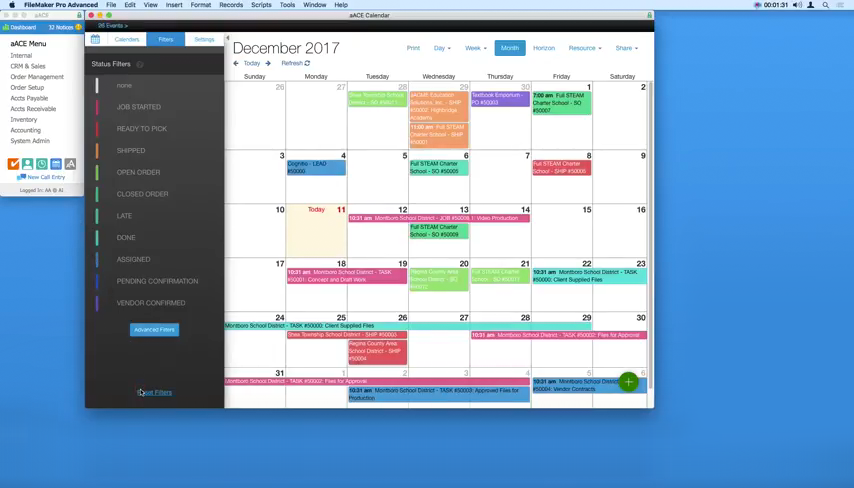
When Drew opens his calendar, he can easily view which shipments have a status of “Ready to Pick” thanks to the calendar’s color-coding and filtering options. To schedule an upcoming day’s shipments, Drew just needs to click on that day, select “View Day,” then navigate to the Resource list in the top menu bar. A table appears with columns for each of the trucks he has available, along with rows representing time-slots in 15-minute increments.

To plan each truck’s route, Drew simply drags shipments from the top-left corner of the table and places them on the right truck at the right time.

But what if a shipment needs to be rescheduled? aACE+ DayBack makes that easy too. Drew can simply drag and drop the shipment to its new date from within the calendar’s Month or Week view.

Now when Drew clicks on that shipment, he’ll see that the shipment record has automatically updated with the new date, and the record log will show that the change was made via the calendar for full visibility.

Over in the Sales department, Account Manager Mara Harvey receives a call from Sam Patel, the Assistant Superintendent at the Montboro School District. Sam wants to place an order for astronomy workshops to be held in April at each of the district’s four elementary schools. To schedule this order and confirm a date with the customer, Mara first needs to know what the Workshop team’s schedule looks like for that month.

Using the calendar’s advanced filters, Mara is able to view events associated with Kristie Hernandez, the Workshop team’s Project Manager. She can see from Kristie’s schedule that the Workshop team is booked to capacity on the first week of April, but that they have ample slots available on the second and third weeks of that month. Sam chooses dates for each of the four workshops; when Mara opens the order, these appointments appear on Kristie’s calendar in real time, giving the Workshop team plenty of time to plan ahead.

To learn how a real-life company uses the aACE+ DayBack calendar, check out our success story on Gable. And if you’d like to know more about this feature or discuss what else aACE can do for you, contact us today to learn more.


“Everybody on our team who knows what we used before is ecstatic over the aACE+DayBack calendar. It's much more user-friendly and much easier for people to get the information that they need, when they need it.” – Jimmie Wolfe, Director of Field Operations, Gable

Learn More

Keeping track of your business’s many moving parts can be a challenge. What if your ERP solution could pull dates from various records and organize them into one easy-to-use, color-coded calendar? aACE+DayBack does that. The aACE+ DayBack calendar combines aACE’s powerful business management... Learn More

-->

Keeping track of your business’s many moving parts can be a challenge. What if your ERP solution could pull dates from various records and organize them into one easy-to-use, color-coded calendar?

aACE+DayBack does that.

The aACE+ DayBack calendar combines aACE’s powerful business management software for Mac and PC with Seedcode’s fully integrated, drag ‘n’ drop, DayBack calendar. The result is seamless scheduling that lets you manage company resources, stay on top of deadlines, keep apprised of each department's activities, and more.

As SeedCode CEO John Sindelar explains, “This calendar isn’t about where you should be, it’s about what you should be working on.” The aACE+ DayBack calendar integration lets you see what tasks you have coming up and what resources you have to fulfill them. Let’s take a look at how it works:


Now that you’ve seen what the aACE+ DayBack calendar has to offer, let’s walk through just some of the ways our fictitious company, aACME Education Solutions, uses it in their daily operations.

Shipping Manager Drew Sanderson runs a tight ship. With hundreds of orders coming in each day and a limited pool of resources with which to fulfill them, he needs to be able to plan down to the hour which shipments are going out on which trucks and when. With aACE+ DayBack, he can do exactly that – all from within his calendar.

When Drew opens his calendar, he can easily view which shipments have a status of “Ready to Pick” thanks to the calendar’s color-coding and filtering options. To schedule an upcoming day’s shipments, Drew just needs to click on that day, select “View Day,” then navigate to the Resource list in the top menu bar. A table appears with columns for each of the trucks he has available, along with rows representing time-slots in 15-minute increments.

To plan each truck’s route, Drew simply drags shipments from the top-left corner of the table and places them on the right truck at the right time.

But what if a shipment needs to be rescheduled? aACE+ DayBack makes that easy too. Drew can simply drag and drop the shipment to its new date from within the calendar’s Month or Week view.

Now when Drew clicks on that shipment, he’ll see that the shipment record has automatically updated with the new date, and the record log will show that the change was made via the calendar for full visibility.

Over in the Sales department, Account Manager Mara Harvey receives a call from Sam Patel, the Assistant Superintendent at the Montboro School District. Sam wants to place an order for astronomy workshops to be held in April at each of the district’s four elementary schools. To schedule this order and confirm a date with the customer, Mara first needs to know what the Workshop team’s schedule looks like for that month.

Using the calendar’s advanced filters, Mara is able to view events associated with Kristie Hernandez, the Workshop team’s Project Manager. She can see from Kristie’s schedule that the Workshop team is booked to capacity on the first week of April, but that they have ample slots available on the second and third weeks of that month. Sam chooses dates for each of the four workshops; when Mara opens the order, these appointments appear on Kristie’s calendar in real time, giving the Workshop team plenty of time to plan ahead.

To learn how a real-life company uses the aACE+ DayBack calendar, check out our success story on Gable. And if you’d like to know more about this feature or discuss what else aACE can do for you, contact us today to learn more.


“Everybody on our team who knows what we used before is ecstatic over the aACE+DayBack calendar. It's much more user-friendly and much easier for people to get the information that they need, when they need it.” – Jimmie Wolfe, Director of Field Operations, Gable

Learn More

Read more about Keep Track of Your Correspondence with aACE Email Integration

Keep Track of Your Correspondence with aACE Email Integration

With aACE, you can.

aACE’s email integration feature spares you from time-consuming data entry by linking emails and their attachments directly to the relevant records anywhere in aACE. This feature works across all aACE modules, so whether your message is about a contact, a project, an order, or more, you can organize your emails directly in your aACE solution. Here’s how:


Now that we’ve seen this feature in action, let’s look at one example of how fictional company aACME Education Solutions uses it in their day-to-day operations:

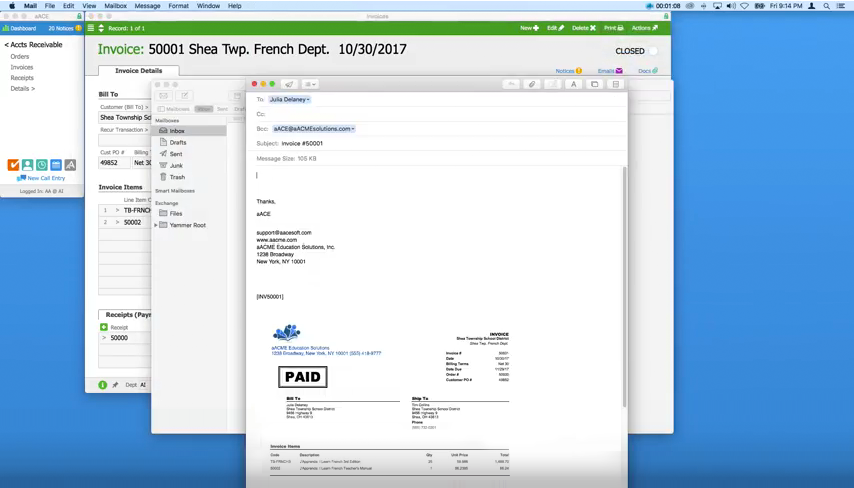
aACME has just fulfilled an order for the Shea Township School District and the invoice has been generated in aACE. John in the Accounts Receivable department is ready to send it to Julia, the school district’s administrative assistant. When John opens the invoice in aACE and selects Email Invoice from the Print menu, his desktop mail app opens with an auto-generated email that has the invoice attached as a PDF. aACE automatically fills in the client’s email address, a pre-set signature, and the invoice’s record ID. Additionally, a special email address for aACME’s aACE solution is included on the BCC line. When John sends the email, a copy appears in aACE’s inbox. Based on keywords in the email, aACE files the message and attachment in three places:

  • the Invoice record for Invoice #50001
  • the Contact record for Julia Delaney, the client who received the invoice
  • the Team Member record of John Smith, the user who sent the invoice

This means that any user with access to these records can view the email right from within aACE. So when Julia contacts her account manager at aACME, Mara Harvey, with a question about the invoice, Mara is able to immediately see what was sent to Julia and when – there's no need to ask John to forward the email or to dig through a long email chain to find the relevant information.

Email Integration Blog Post
 

With aACE’s email integration feature, Mara and her colleagues have everything they need right at their fingertips.

To see how other aACE features could work for your business, check out our aACE Videos series. And if you’d like to know more about this feature or discuss what else aACE can do for you, contact us today to learn more.

Learn More

Most businesses today rely on email to exchange information, but it can be all too easy for messages to get lost in your inbox – and when that happens, you risk missing out on vital details that could impact your communication with your customers. Wouldn’t it be great if you could file those... Learn More

-->

Most businesses today rely on email to exchange information, but it can be all too easy for messages to get lost in your inbox – and when that happens, you risk missing out on vital details that could impact your communication with your customers. Wouldn’t it be great if you could file those messages with their associated records in your ERP solution, without having to manually copy and paste the text?

With aACE, you can.

aACE’s email integration feature spares you from time-consuming data entry by linking emails and their attachments directly to the relevant records anywhere in aACE. This feature works across all aACE modules, so whether your message is about a contact, a project, an order, or more, you can organize your emails directly in your aACE solution. Here’s how:


Now that we’ve seen this feature in action, let’s look at one example of how fictional company aACME Education Solutions uses it in their day-to-day operations:

aACME has just fulfilled an order for the Shea Township School District and the invoice has been generated in aACE. John in the Accounts Receivable department is ready to send it to Julia, the school district’s administrative assistant. When John opens the invoice in aACE and selects Email Invoice from the Print menu, his desktop mail app opens with an auto-generated email that has the invoice attached as a PDF. aACE automatically fills in the client’s email address, a pre-set signature, and the invoice’s record ID. Additionally, a special email address for aACME’s aACE solution is included on the BCC line. When John sends the email, a copy appears in aACE’s inbox. Based on keywords in the email, aACE files the message and attachment in three places:

  • the Invoice record for Invoice #50001
  • the Contact record for Julia Delaney, the client who received the invoice
  • the Team Member record of John Smith, the user who sent the invoice

This means that any user with access to these records can view the email right from within aACE. So when Julia contacts her account manager at aACME, Mara Harvey, with a question about the invoice, Mara is able to immediately see what was sent to Julia and when – there's no need to ask John to forward the email or to dig through a long email chain to find the relevant information.

Email Integration Blog Post
 

With aACE’s email integration feature, Mara and her colleagues have everything they need right at their fingertips.

To see how other aACE features could work for your business, check out our aACE Videos series. And if you’d like to know more about this feature or discuss what else aACE can do for you, contact us today to learn more.

Learn More

Read more about Seamlessly Link Records in aACE to Files on Your Server – Here’s How

Seamlessly Link Records in aACE to Files on Your Server – Here’s How

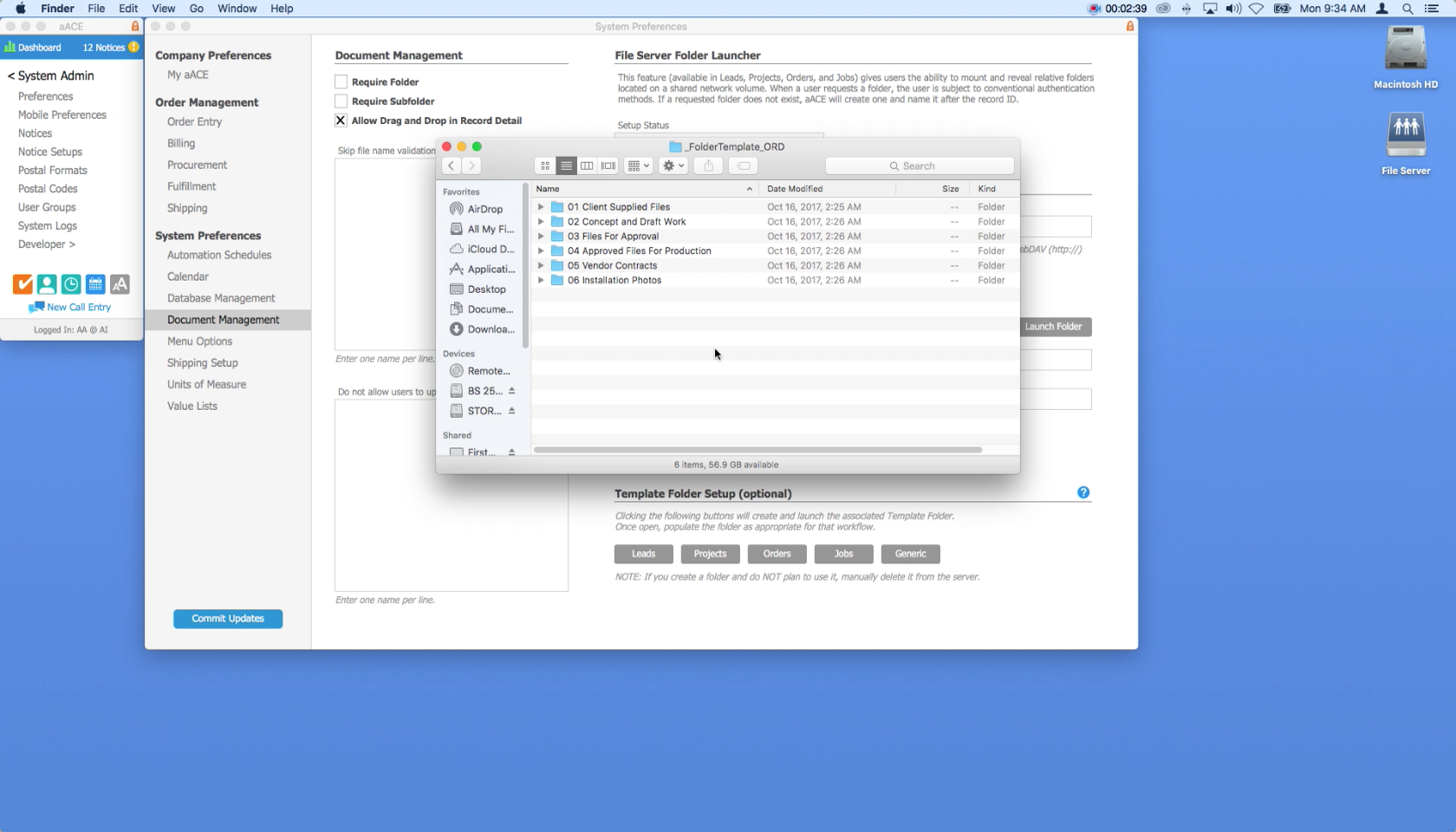
aACE’s File Server Folder Launcher feature allows you to keep files organized on your company server while making it easy to access the folders you need directly from the relevant Lead, Project, Order, or Job record in aACE. Let’s take a look at how it works.


Now that you’ve seen this feature in action, let’s walk through how one company uses it in their day-to-day operations.

Our sample company, aACME Educational Services, publishes educational resources and programs for students, teachers, and school administrators. They’ve just received an order for a School Spirit Week science workshop from the Full STEAM Charter School (FSCS). As part of the order, FSCS has asked for custom signage and curricular materials to promote the school’s astronomy program.

aACME’s graphic designers are not aACE users, so all of their work stays on the company shared drive. Account manager Mara Harvey sends drafts to the client and passes their feedback on to the creative team. Because aACME offers workshops like this regularly, they have a template set up with their standard workflow.

Mara starts by opening the order’s record in aACE. From the Actions menu, she selects “Reveal File Server Folder”. This creates a new folder on her shared drive that’s pre-populated with the subfolders she and her colleagues use to keep their files organized. When Mara follows up with FSCS, she can easily access all of the files related to their order right from her aACE solution – ensuring she has everything she needs close at hand.

If you’d like to know more about this feature or discuss what else aACE can do for you, contact us today to learn more.

Learn More

aACE’s document management system is great for storing files directly in aACE, but if you’re in a creative or an engineering environment, you may need to keep files on your shared company server where colleagues who aren’t aACE users can access them. Wouldn’t it be great if you could access... Learn More

-->

aACE’s document management system is great for storing files directly in aACE, but if you’re in a creative or an engineering environment, you may need to keep files on your shared company server where colleagues who aren’t aACE users can access them. Wouldn’t it be great if you could access those server files directly from the relevant records in your ERP solution?

With aACE, you can.

aACE’s File Server Folder Launcher feature allows you to keep files organized on your company server while making it easy to access the folders you need directly from the relevant Lead, Project, Order, or Job record in aACE. Let’s take a look at how it works.


Now that you’ve seen this feature in action, let’s walk through how one company uses it in their day-to-day operations.

Our sample company, aACME Educational Services, publishes educational resources and programs for students, teachers, and school administrators. They’ve just received an order for a School Spirit Week science workshop from the Full STEAM Charter School (FSCS). As part of the order, FSCS has asked for custom signage and curricular materials to promote the school’s astronomy program.

aACME’s graphic designers are not aACE users, so all of their work stays on the company shared drive. Account manager Mara Harvey sends drafts to the client and passes their feedback on to the creative team. Because aACME offers workshops like this regularly, they have a template set up with their standard workflow.

Mara starts by opening the order’s record in aACE. From the Actions menu, she selects “Reveal File Server Folder”. This creates a new folder on her shared drive that’s pre-populated with the subfolders she and her colleagues use to keep their files organized. When Mara follows up with FSCS, she can easily access all of the files related to their order right from her aACE solution – ensuring she has everything she needs close at hand.

If you’d like to know more about this feature or discuss what else aACE can do for you, contact us today to learn more.

Learn More

Scroll to Top