



Business Process Improvement Through Software

Dive into the details to discover how aACE can help your business.

aACE software blog -  a complete resource for SMBs looking to improve their business processes. Read our articles on all things CRM, Accounting Software, ERP, Inventory Management & more

Business Process Improvement Through Software!

All things CRM, Accounting Software, ERP, Inventory Management & more

Read more about Keep Your Production Staff Organized on the Floor with the aACE Job Shop App

Keep Your Production Staff Organized on the Floor with the aACE Job Shop App

A Day in the Life

aACME Education Solutions refurbishes electronic whiteboards for use in schools and college classrooms. Because these whiteboards aren’t being sold new, each one goes through rigorous repairs and inspections—and it’s vital that each step is followed to the letter. That’s where aACE’s Task Groups module come in.

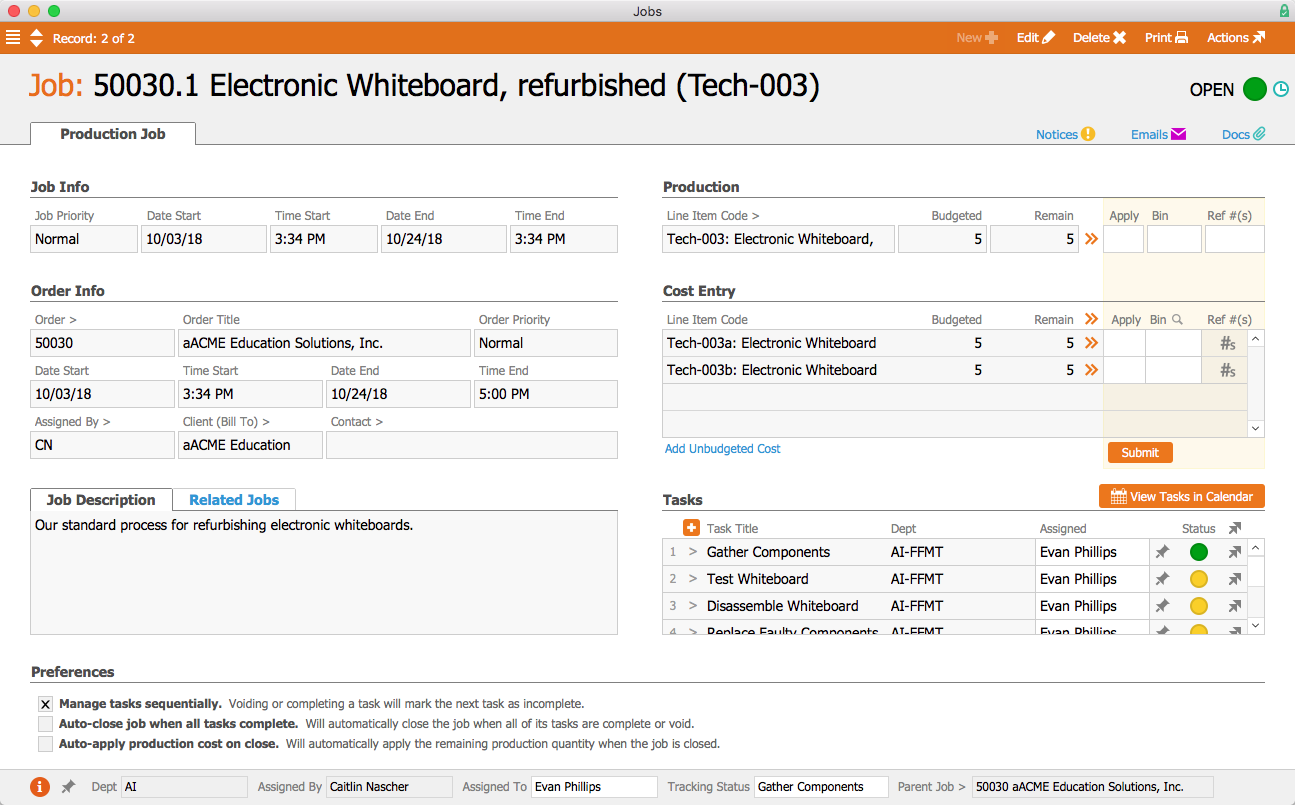
When a production order for the refurbished whiteboards is opened, aACE automatically generates a job associated with the order. Because the “Electronic Whiteboard Refurbishment Process” task group has been linked to the Refurbished Electronic Whiteboard line item code, the job is automatically populated with a pre-set list of tasks as specified in the task group.
 

Jobs


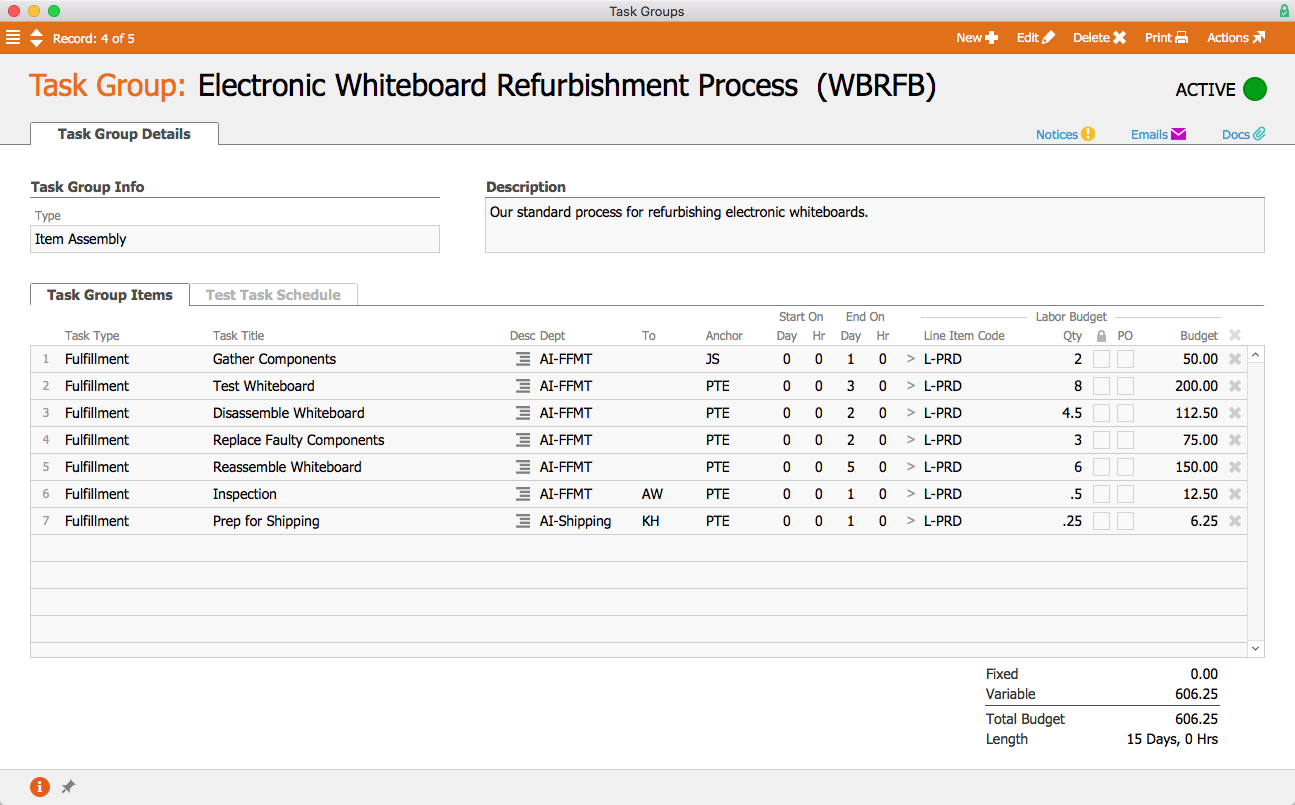
The first task, Gather Components, is configured to begin as soon as the job is opened. Tasks can be assigned to either a department or a specific user; because this task has been assigned to the Fulfillment Department, aACME’s Fulfillment Manager Evan Phillips is automatically assigned to the task. On the production floor, Evan can apply time and materials to the task using the aACE Job Shop app. In the task group, we can see that this first task is set to end one business day after the job starts. Two hours of labor have been budgeted for this task, and it has been assigned the line item code L-PRODUCTION. That is the line item code to which Evan’s time will be applied when he works on this task. When Evan marks the task complete, the next task, Test Whiteboard, will automatically begin.
 

Task Group


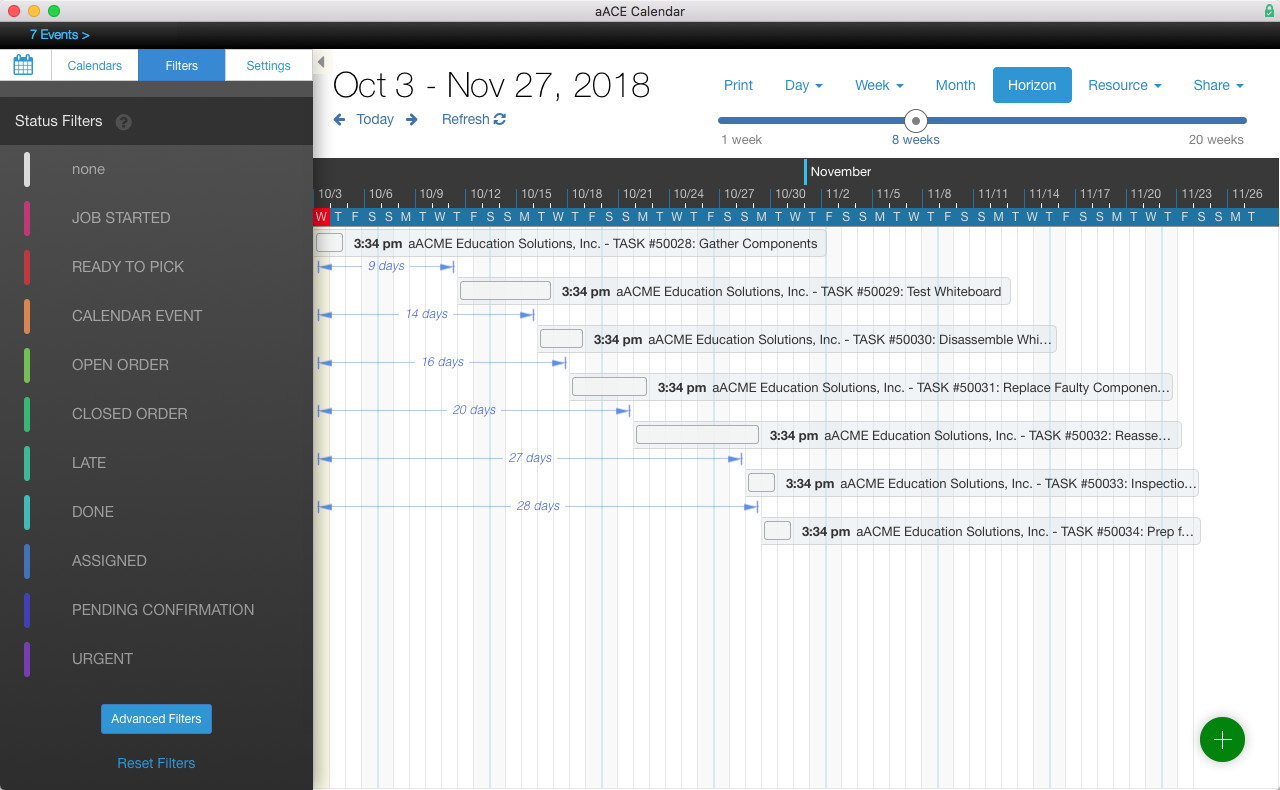
In the aACE+ DayBack calendar, we can see that all of the tasks associated with the job have been scheduled according to the amount of time they were allotted in the task group. But what if troubleshooting the whiteboards takes longer than expected? aACE’s anchoring features make rescheduling a snap. Because each task is set to begin only when the task before it has been completed, moving the Test Whiteboard task up a week will also move all of the tasks after it by the same amount of time.
 

Calendar-1


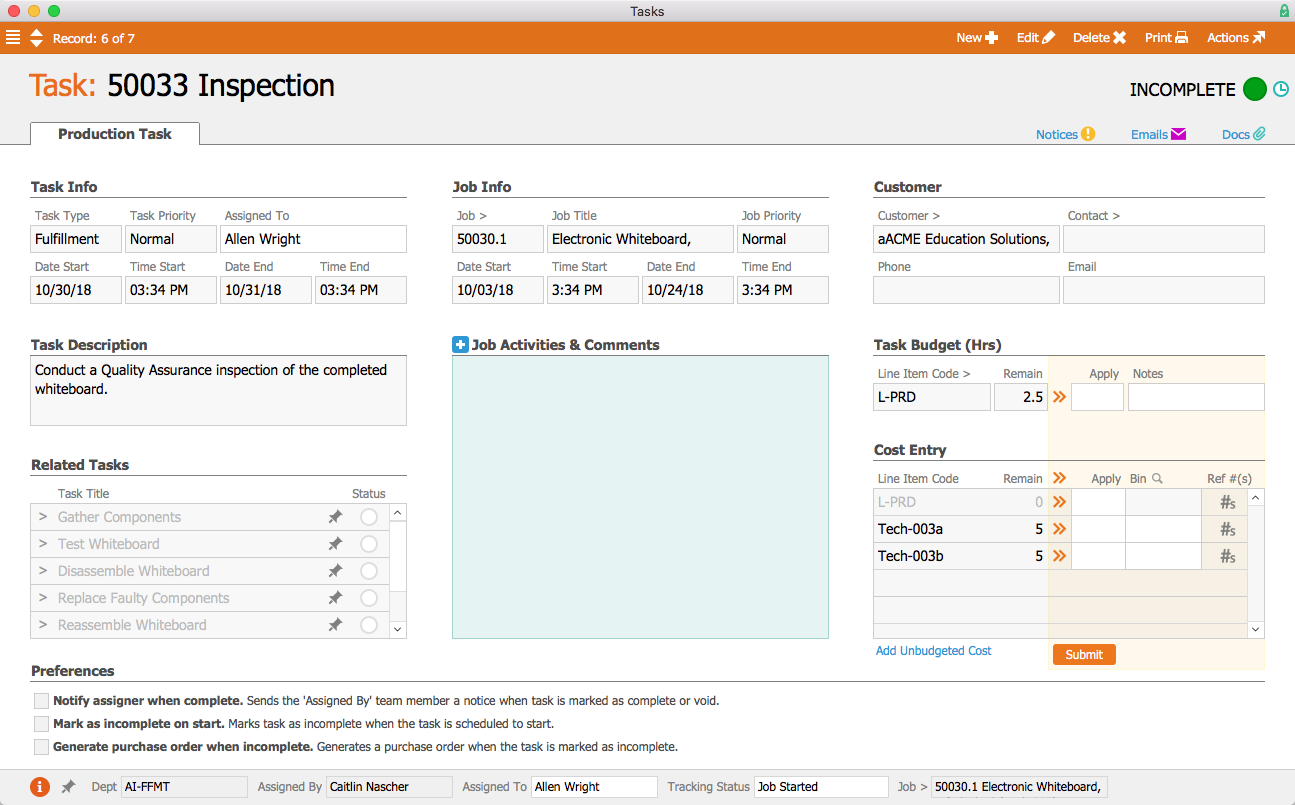
When the production team has finished the whiteboards, they need to be inspected. This task has been assigned to Allen Wright, aACME’s Quality Control Officer; when he’s ready to begin, the task will appear in his Tasks module with a green status indicator. In the task’s detail view he can view related tasks as well as apply time and materials to the task. He can also leave comments and activity notes that will appear in all task records associated with the job.
 

Task


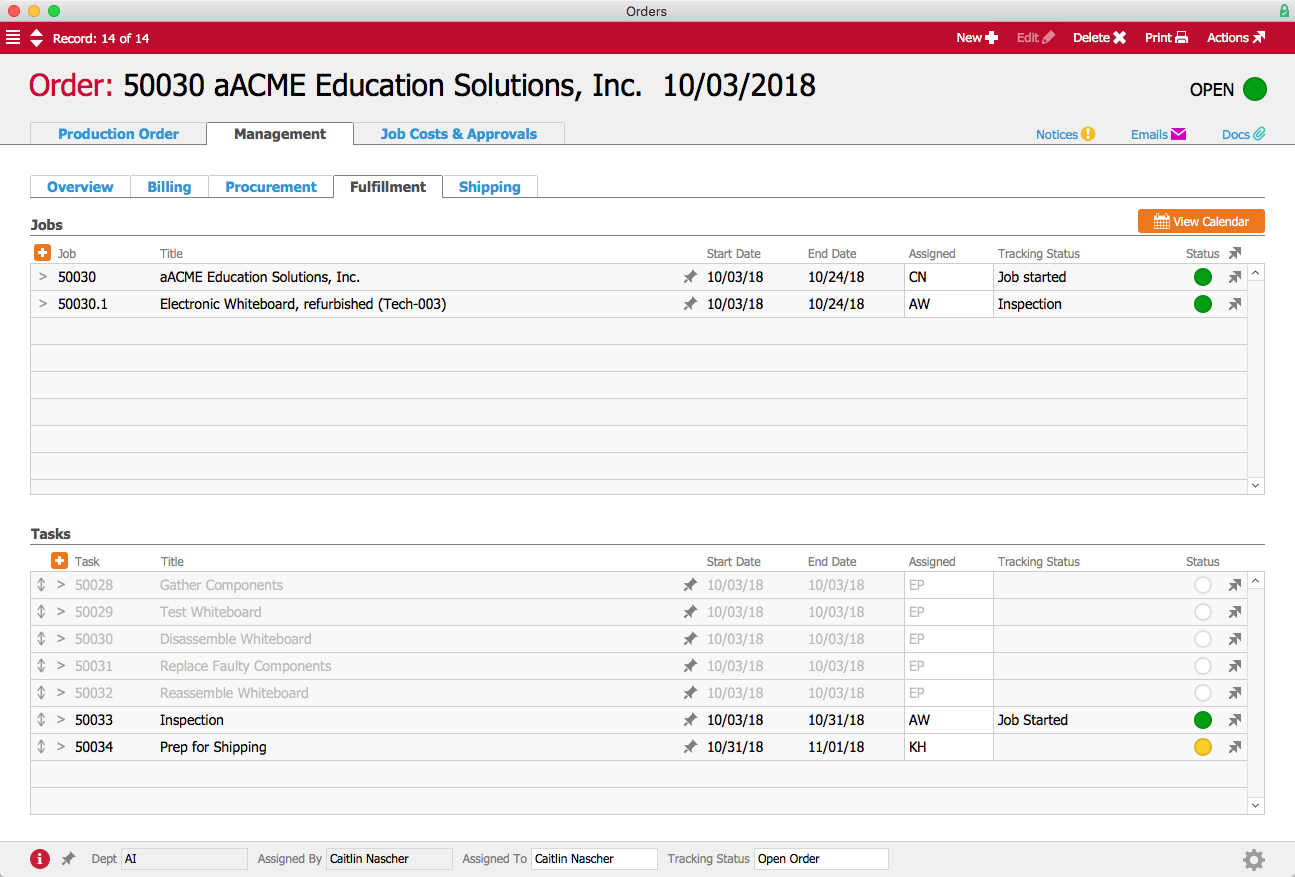
If the manager who placed the order wants to check in on how it’s progressing, the order’s Fulfillment tab shows which tasks have been completed, which tasks are in progress, which have yet to start, and when they are all scheduled to begin and end. Gone are the days of following up with other departments to find out when a job is going to be done—aACE provides all of that information at a glance!
 

Order


Now that we’ve seen how aACE’s Task Groups work for our fictional company, take a look at our Gable success story to learn more about how this feature has helped a real aACE client better track their orders. Discover even more ways that aACE works for everyday businesses when you check out our other success stories below.

"aACE transformed our order fulfillment process during implementation by helping us see trouble spots in our processes."
- Derek Navratil, IT Administrator, Essential Water Solutions

Learn More

In every business there are processes that must be carried out the same way each and every time. aACE Task Groups allow you to create templates for your standard workflows, helping to ensure that your operations run smoothly and according to schedule. And if one step in your process is delayed,... Learn More

-->

In every business there are processes that must be carried out the same way each and every time. aACE Task Groups allow you to create templates for your standard workflows, helping to ensure that your operations run smoothly and according to schedule. And if one step in your process is delayed, aACE’s Task Anchoring feature automatically shifts the rest of the tasks to accommodate your new timeline. To learn more about Task Groups, let’s take a look at how our fictional company, aACME Education Solutions, uses them in their day-to-day business.

A Day in the Life

aACME Education Solutions refurbishes electronic whiteboards for use in schools and college classrooms. Because these whiteboards aren’t being sold new, each one goes through rigorous repairs and inspections—and it’s vital that each step is followed to the letter. That’s where aACE’s Task Groups module come in.

When a production order for the refurbished whiteboards is opened, aACE automatically generates a job associated with the order. Because the “Electronic Whiteboard Refurbishment Process” task group has been linked to the Refurbished Electronic Whiteboard line item code, the job is automatically populated with a pre-set list of tasks as specified in the task group.


Jobs


The first task, Gather Components, is configured to begin as soon as the job is opened. Tasks can be assigned to either a department or a specific user; because this task has been assigned to the Fulfillment Department, aACME’s Fulfillment Manager Evan Phillips is automatically assigned to the task. On the production floor, Evan can apply time and materials to the task using the aACE Job Shop app. In the task group, we can see that this first task is set to end one business day after the job starts. Two hours of labor have been budgeted for this task, and it has been assigned the line item code L-PRODUCTION. That is the line item code to which Evan’s time will be applied when he works on this task. When Evan marks the task complete, the next task, Test Whiteboard, will automatically begin.


Task Group


In the aACE+ DayBack calendar, we can see that all of the tasks associated with the job have been scheduled according to the amount of time they were allotted in the task group. But what if troubleshooting the whiteboards takes longer than expected? aACE’s anchoring features make rescheduling a snap. Because each task is set to begin only when the task before it has been completed, moving the Test Whiteboard task up a week will also move all of the tasks after it by the same amount of time.


Calendar-1


When the production team has finished the whiteboards, they need to be inspected. This task has been assigned to Allen Wright, aACME’s Quality Control Officer; when he’s ready to begin, the task will appear in his Tasks module with a green status indicator. In the task’s detail view he can view related tasks as well as apply time and materials to the task. He can also leave comments and activity notes that will appear in all task records associated with the job.


Task


If the manager who placed the order wants to check in on how it’s progressing, the order’s Fulfillment tab shows which tasks have been completed, which tasks are in progress, which have yet to start, and when they are all scheduled to begin and end. Gone are the days of following up with other departments to find out when a job is going to be done—aACE provides all of that information at a glance!


Order


Now that we’ve seen how aACE’s Task Groups work for our fictional company, take a look at our Gable success story to learn more about how this feature has helped a real aACE client better track their orders. Discover even more ways that aACE works for everyday businesses when you check out our other success stories below.

"aACE transformed our order fulfillment process during implementation by helping us see trouble spots in our processes."
- Derek Navratil, IT Administrator, Essential Water Solutions
Learn More

Read more about Automate Your Essential Workflows with aACE Task Groups

Automate Your Essential Workflows with aACE Task Groups

A Day in the Life

aACME Education Solutions refurbishes electronic whiteboards for use in schools and college classrooms. Because these whiteboards aren’t being sold new, each one goes through rigorous repairs and inspections—and it’s vital that each step is followed to the letter. That’s where aACE’s Task Groups module come in.

When a production order for the refurbished whiteboards is opened, aACE automatically generates a job associated with the order. Because the “Electronic Whiteboard Refurbishment Process” task group has been linked to the Refurbished Electronic Whiteboard line item code, the job is automatically populated with a pre-set list of tasks as specified in the task group.


Jobs


The first task, Gather Components, is configured to begin as soon as the job is opened. Tasks can be assigned to either a department or a specific user; because this task has been assigned to the Fulfillment Department, aACME’s Fulfillment Manager Evan Phillips is automatically assigned to the task. On the production floor, Evan can apply time and materials to the task using the aACE Job Shop app. In the task group, we can see that this first task is set to end one business day after the job starts. Two hours of labor have been budgeted for this task, and it has been assigned the line item code L-PRODUCTION. That is the line item code to which Evan’s time will be applied when he works on this task. When Evan marks the task complete, the next task, Test Whiteboard, will automatically begin.


Task Group


In the aACE+ DayBack calendar, we can see that all of the tasks associated with the job have been scheduled according to the amount of time they were allotted in the task group. But what if troubleshooting the whiteboards takes longer than expected? aACE’s anchoring features make rescheduling a snap. Because each task is set to begin only when the task before it has been completed, moving the Test Whiteboard task up a week will also move all of the tasks after it by the same amount of time.


Calendar-1


When the production team has finished the whiteboards, they need to be inspected. This task has been assigned to Allen Wright, aACME’s Quality Control Officer; when he’s ready to begin, the task will appear in his Tasks module with a green status indicator. In the task’s detail view he can view related tasks as well as apply time and materials to the task. He can also leave comments and activity notes that will appear in all task records associated with the job.


Task


If the manager who placed the order wants to check in on how it’s progressing, the order’s Fulfillment tab shows which tasks have been completed, which tasks are in progress, which have yet to start, and when they are all scheduled to begin and end. Gone are the days of following up with other departments to find out when a job is going to be done—aACE provides all of that information at a glance!


Order


Now that we’ve seen how aACE’s Task Groups work for our fictional company, take a look at our Gable success story to learn more about how this feature has helped a real aACE client better track their orders. Discover even more ways that aACE works for everyday businesses when you check out our other success stories below.

"aACE transformed our order fulfillment process during implementation by helping us see trouble spots in our processes."
- Derek Navratil, IT Administrator, Essential Water Solutions
Learn More

In every business there are processes that must be carried out the same way each and every time. aACE Task Groups allow you to create templates for your standard workflows, helping to ensure that your operations run smoothly and according to schedule. And if one step in your process is delayed,... Learn More

-->

In every business there are processes that must be carried out the same way each and every time. aACE Task Groups allow you to create templates for your standard workflows, helping to ensure that your operations run smoothly and according to schedule. And if one step in your process is delayed, aACE’s Task Anchoring feature automatically shifts the rest of the tasks to accommodate your new timeline. To learn more about Task Groups, let’s take a look at how our fictional company, aACME Education Solutions, uses them in their day-to-day business.

A Day in the Life

aACME Education Solutions refurbishes electronic whiteboards for use in schools and college classrooms. Because these whiteboards aren’t being sold new, each one goes through rigorous repairs and inspections—and it’s vital that each step is followed to the letter. That’s where aACE’s Task Groups module come in.

When a production order for the refurbished whiteboards is opened, aACE automatically generates a job associated with the order. Because the “Electronic Whiteboard Refurbishment Process” task group has been linked to the Refurbished Electronic Whiteboard line item code, the job is automatically populated with a pre-set list of tasks as specified in the task group.


Jobs


The first task, Gather Components, is configured to begin as soon as the job is opened. Tasks can be assigned to either a department or a specific user; because this task has been assigned to the Fulfillment Department, aACME’s Fulfillment Manager Evan Phillips is automatically assigned to the task. On the production floor, Evan can apply time and materials to the task using the aACE Job Shop app. In the task group, we can see that this first task is set to end one business day after the job starts. Two hours of labor have been budgeted for this task, and it has been assigned the line item code L-PRODUCTION. That is the line item code to which Evan’s time will be applied when he works on this task. When Evan marks the task complete, the next task, Test Whiteboard, will automatically begin.


Task Group


In the aACE+ DayBack calendar, we can see that all of the tasks associated with the job have been scheduled according to the amount of time they were allotted in the task group. But what if troubleshooting the whiteboards takes longer than expected? aACE’s anchoring features make rescheduling a snap. Because each task is set to begin only when the task before it has been completed, moving the Test Whiteboard task up a week will also move all of the tasks after it by the same amount of time.


Calendar-1


When the production team has finished the whiteboards, they need to be inspected. This task has been assigned to Allen Wright, aACME’s Quality Control Officer; when he’s ready to begin, the task will appear in his Tasks module with a green status indicator. In the task’s detail view he can view related tasks as well as apply time and materials to the task. He can also leave comments and activity notes that will appear in all task records associated with the job.


Task


If the manager who placed the order wants to check in on how it’s progressing, the order’s Fulfillment tab shows which tasks have been completed, which tasks are in progress, which have yet to start, and when they are all scheduled to begin and end. Gone are the days of following up with other departments to find out when a job is going to be done—aACE provides all of that information at a glance!


Order


Now that we’ve seen how aACE’s Task Groups work for our fictional company, take a look at our Gable success story to learn more about how this feature has helped a real aACE client better track their orders. Discover even more ways that aACE works for everyday businesses when you check out our other success stories below.

"aACE transformed our order fulfillment process during implementation by helping us see trouble spots in our processes."
- Derek Navratil, IT Administrator, Essential Water Solutions
Learn More

Read more about Save Time, Improve Accuracy in Time and Materials Tracking With aACE Job Shop App

Save Time, Improve Accuracy in Time and Materials Tracking With aACE Job Shop App

With the aACE Job Shop app, there's a better way.

The aACE Job Shop app is a mobile app that can be deployed on shared iPads. It allows your production staff to quickly log in and record time or apply materials to a job. Information from the app is passed back to aACE automatically, allowing aACE users in the office to stay apprised of what’s happening on the production floor.

Let’s take a look at how it works:

Now that we’ve seen the Job Shop app in action, let’s see how the fictional company aACME Education Solutions uses it in their day-to-day operations.

aACME customer Brightside Charter School orders two mounted whiteboards for their classrooms. The whiteboards need to be assembled before they can be shipped. When the order is opened, aACE automatically generates a job record for the assembly. Inside the job are a series of tasks and a bill of materials.

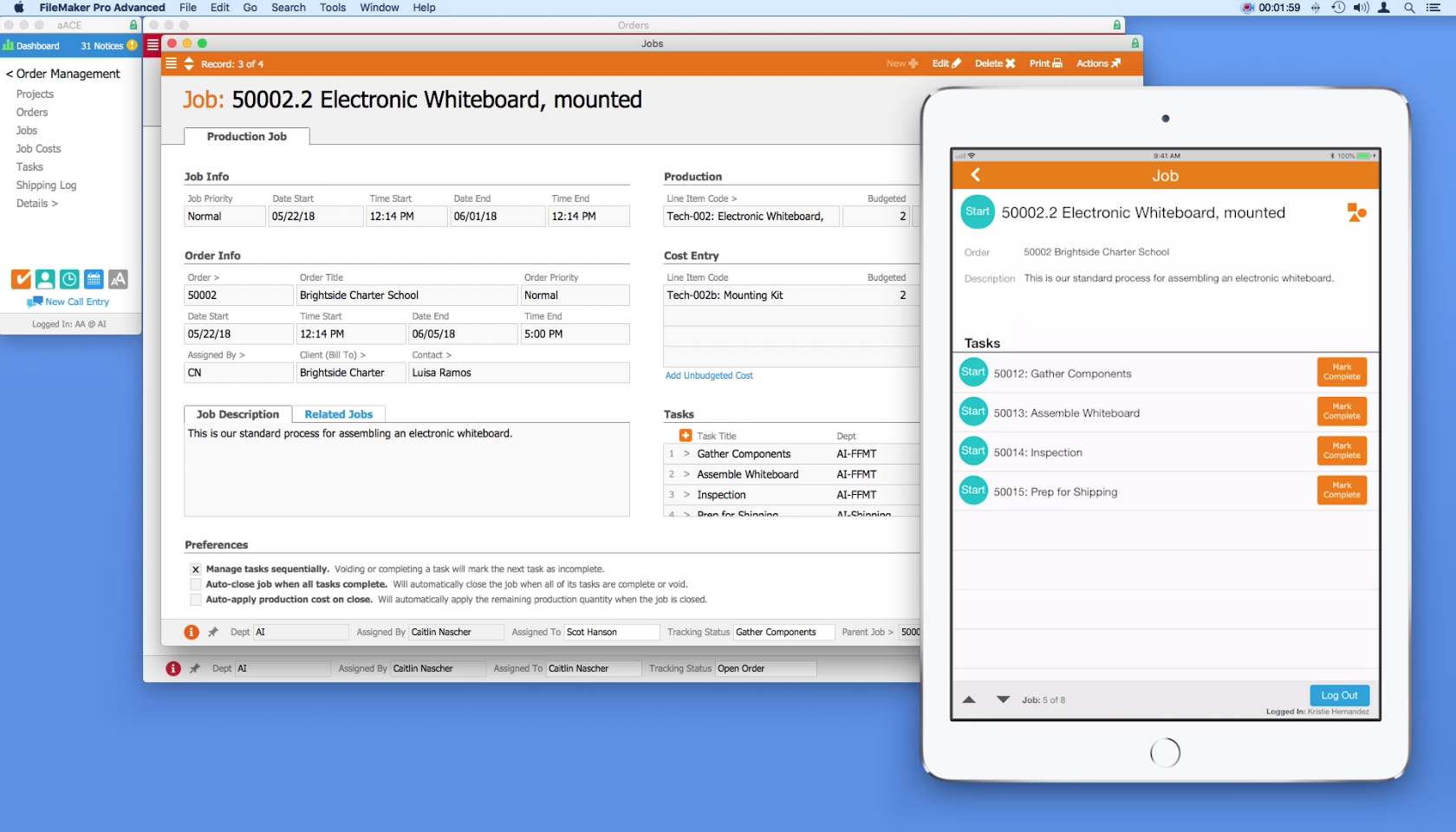
On the production floor, aACME employee Evan Phillips is ready to work. He goes to any of the shared iPads mounted on the wall throughout the site and logs into the Job Shop app by entering his unique PIN. From a list of open jobs, he chooses the Brightside Charter School whiteboard assembly. In the job’s detail view, Evan can see the order associated with the job, a description of the job, and a list of tasks that make up the job. To start a task, he simply taps that task’s Start button. The app then logs him out automatically, clearing the way for the next employee to log in.

The first task in the whiteboard assembly job is to gather materials. When Evan has finished collecting the components needed for the whiteboard, he logs back into the app. To enter the parts in the job record, he taps the Apply Materials icon. Using a barcode scanner connected to the iPad, he quickly scans in each of the required materials. The Job Shop app pushes that information back to the central aACE solution, automatically updating the job record with the materials applied.

After Evan is finished with a task, he logs in and taps the Mark Complete button. The task is also marked complete in aACE. Now he can see that the next task, Assemble Whiteboard, is ready to start.

Back in the office, Account Manager Mara Harvey gets a call from her contact at Brightside Charter School asking for a status update on the whiteboards. With just a few clicks, Mara can see that the job has been started, the materials have been applied, and assembly is currently underway.

At the end of the day, Evan submits his time by logging into the app and tapping the Timesheet button. Here he can review a list of all of the tasks he worked on today and how much time he spent on each task. He notices a mistake though – he forgot to pause a task while he went on his lunch break. The app allows Evan to record a note to his manager which will be sent along with the timesheet so that he can explain the discrepancy.

Evan’s manager can review the notes in aACE, adjust the timesheet, then approve it.

When the job is finished, the project manager can review the details in aACE, checking and approving the time and materials that were applied to the job.

The fully-integrated, easy-to-use Job Shop app allows managers to keep track of what their teams are doing throughout the day, while also giving employees the ability to track their progress without slowing down. To learn more about this app or find out what else aACE can do for your business, contact us today.

"Without much training, you can logically understand how this program fits into your work environment. The program is user friendly and easy enough for our whole staff, with varying levels of technical skills, to embrace." ~ Lili Hall, President, KNOCK Inc.
Learn More

Are your production staff recording time and material usage on paper, in Excel, or with software that doesn't "talk" to your business management solution? Is it somebody's job to manually key that data into your accounting system? With the aACE Job Shop app, there's a better way. The aACE Job Shop... Learn More

-->

Are your production staff recording time and material usage on paper, in Excel, or with software that doesn't "talk" to your business management solution? Is it somebody's job to manually key that data into your accounting system?

With the aACE Job Shop app, there's a better way.

The aACE Job Shop app is a mobile app that can be deployed on shared iPads. It allows your production staff to quickly log in and record time or apply materials to a job. Information from the app is passed back to aACE automatically, allowing aACE users in the office to stay apprised of what’s happening on the production floor.

Let’s take a look at how it works:

Now that we’ve seen the Job Shop app in action, let’s see how the fictional company aACME Education Solutions uses it in their day-to-day operations.

aACME customer Brightside Charter School orders two mounted whiteboards for their classrooms. The whiteboards need to be assembled before they can be shipped. When the order is opened, aACE automatically generates a job record for the assembly. Inside the job are a series of tasks and a bill of materials.

On the production floor, aACME employee Evan Phillips is ready to work. He goes to any of the shared iPads mounted on the wall throughout the site and logs into the Job Shop app by entering his unique PIN. From a list of open jobs, he chooses the Brightside Charter School whiteboard assembly. In the job’s detail view, Evan can see the order associated with the job, a description of the job, and a list of tasks that make up the job. To start a task, he simply taps that task’s Start button. The app then logs him out automatically, clearing the way for the next employee to log in.

The first task in the whiteboard assembly job is to gather materials. When Evan has finished collecting the components needed for the whiteboard, he logs back into the app. To enter the parts in the job record, he taps the Apply Materials icon. Using a barcode scanner connected to the iPad, he quickly scans in each of the required materials. The Job Shop app pushes that information back to the central aACE solution, automatically updating the job record with the materials applied.

After Evan is finished with a task, he logs in and taps the Mark Complete button. The task is also marked complete in aACE. Now he can see that the next task, Assemble Whiteboard, is ready to start.

Back in the office, Account Manager Mara Harvey gets a call from her contact at Brightside Charter School asking for a status update on the whiteboards. With just a few clicks, Mara can see that the job has been started, the materials have been applied, and assembly is currently underway.

At the end of the day, Evan submits his time by logging into the app and tapping the Timesheet button. Here he can review a list of all of the tasks he worked on today and how much time he spent on each task. He notices a mistake though – he forgot to pause a task while he went on his lunch break. The app allows Evan to record a note to his manager which will be sent along with the timesheet so that he can explain the discrepancy.

Evan’s manager can review the notes in aACE, adjust the timesheet, then approve it.

When the job is finished, the project manager can review the details in aACE, checking and approving the time and materials that were applied to the job.

The fully-integrated, easy-to-use Job Shop app allows managers to keep track of what their teams are doing throughout the day, while also giving employees the ability to track their progress without slowing down. To learn more about this app or find out what else aACE can do for your business, contact us today.

"Without much training, you can logically understand how this program fits into your work environment. The program is user friendly and easy enough for our whole staff, with varying levels of technical skills, to embrace." ~ Lili Hall, President, KNOCK Inc.
Learn More

Read more about Make Scheduling a Snap with the aACE+ DayBack Calendar

Make Scheduling a Snap with the aACE+ DayBack Calendar

aACE+DayBack does that.

The aACE+ DayBack calendar combines aACE’s powerful business management software for Mac and PC with Seedcode’s fully integrated, drag ‘n’ drop, DayBack calendar. The result is seamless scheduling that lets you manage company resources, stay on top of deadlines, keep apprised of each department's activities, and more.

As SeedCode CEO John Sindelar explains, “This calendar isn’t about where you should be, it’s about what you should be working on.” The aACE+ DayBack calendar integration lets you see what tasks you have coming up and what resources you have to fulfill them. Let’s take a look at how it works:


Now that you’ve seen what the aACE+ DayBack calendar has to offer, let’s walk through just some of the ways our fictitious company, aACME Education Solutions, uses it in their daily operations.

Shipping Manager Drew Sanderson runs a tight ship. With hundreds of orders coming in each day and a limited pool of resources with which to fulfill them, he needs to be able to plan down to the hour which shipments are going out on which trucks and when. With aACE+ DayBack, he can do exactly that – all from within his calendar.

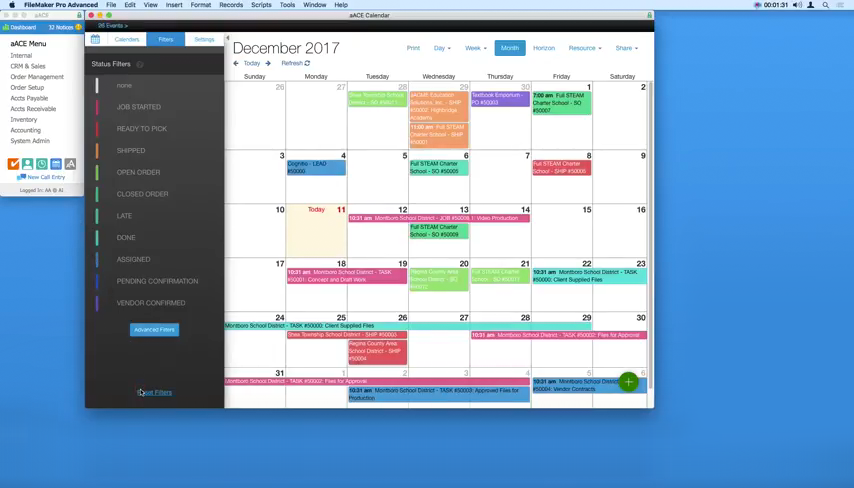
When Drew opens his calendar, he can easily view which shipments have a status of “Ready to Pick” thanks to the calendar’s color-coding and filtering options. To schedule an upcoming day’s shipments, Drew just needs to click on that day, select “View Day,” then navigate to the Resource list in the top menu bar. A table appears with columns for each of the trucks he has available, along with rows representing time-slots in 15-minute increments.

To plan each truck’s route, Drew simply drags shipments from the top-left corner of the table and places them on the right truck at the right time.

But what if a shipment needs to be rescheduled? aACE+ DayBack makes that easy too. Drew can simply drag and drop the shipment to its new date from within the calendar’s Month or Week view.

Now when Drew clicks on that shipment, he’ll see that the shipment record has automatically updated with the new date, and the record log will show that the change was made via the calendar for full visibility.

Over in the Sales department, Account Manager Mara Harvey receives a call from Sam Patel, the Assistant Superintendent at the Montboro School District. Sam wants to place an order for astronomy workshops to be held in April at each of the district’s four elementary schools. To schedule this order and confirm a date with the customer, Mara first needs to know what the Workshop team’s schedule looks like for that month.

Using the calendar’s advanced filters, Mara is able to view events associated with Kristie Hernandez, the Workshop team’s Project Manager. She can see from Kristie’s schedule that the Workshop team is booked to capacity on the first week of April, but that they have ample slots available on the second and third weeks of that month. Sam chooses dates for each of the four workshops; when Mara opens the order, these appointments appear on Kristie’s calendar in real time, giving the Workshop team plenty of time to plan ahead.

To learn how a real-life company uses the aACE+ DayBack calendar, check out our success story on Gable. And if you’d like to know more about this feature or discuss what else aACE can do for you, contact us today to learn more.


“Everybody on our team who knows what we used before is ecstatic over the aACE+DayBack calendar. It's much more user-friendly and much easier for people to get the information that they need, when they need it.” – Jimmie Wolfe, Director of Field Operations, Gable

Learn More

Keeping track of your business’s many moving parts can be a challenge. What if your ERP solution could pull dates from various records and organize them into one easy-to-use, color-coded calendar? aACE+DayBack does that. The aACE+ DayBack calendar combines aACE’s powerful business management... Learn More

-->

Keeping track of your business’s many moving parts can be a challenge. What if your ERP solution could pull dates from various records and organize them into one easy-to-use, color-coded calendar?

aACE+DayBack does that.

The aACE+ DayBack calendar combines aACE’s powerful business management software for Mac and PC with Seedcode’s fully integrated, drag ‘n’ drop, DayBack calendar. The result is seamless scheduling that lets you manage company resources, stay on top of deadlines, keep apprised of each department's activities, and more.

As SeedCode CEO John Sindelar explains, “This calendar isn’t about where you should be, it’s about what you should be working on.” The aACE+ DayBack calendar integration lets you see what tasks you have coming up and what resources you have to fulfill them. Let’s take a look at how it works:


Now that you’ve seen what the aACE+ DayBack calendar has to offer, let’s walk through just some of the ways our fictitious company, aACME Education Solutions, uses it in their daily operations.

Shipping Manager Drew Sanderson runs a tight ship. With hundreds of orders coming in each day and a limited pool of resources with which to fulfill them, he needs to be able to plan down to the hour which shipments are going out on which trucks and when. With aACE+ DayBack, he can do exactly that – all from within his calendar.

When Drew opens his calendar, he can easily view which shipments have a status of “Ready to Pick” thanks to the calendar’s color-coding and filtering options. To schedule an upcoming day’s shipments, Drew just needs to click on that day, select “View Day,” then navigate to the Resource list in the top menu bar. A table appears with columns for each of the trucks he has available, along with rows representing time-slots in 15-minute increments.

To plan each truck’s route, Drew simply drags shipments from the top-left corner of the table and places them on the right truck at the right time.

But what if a shipment needs to be rescheduled? aACE+ DayBack makes that easy too. Drew can simply drag and drop the shipment to its new date from within the calendar’s Month or Week view.

Now when Drew clicks on that shipment, he’ll see that the shipment record has automatically updated with the new date, and the record log will show that the change was made via the calendar for full visibility.

Over in the Sales department, Account Manager Mara Harvey receives a call from Sam Patel, the Assistant Superintendent at the Montboro School District. Sam wants to place an order for astronomy workshops to be held in April at each of the district’s four elementary schools. To schedule this order and confirm a date with the customer, Mara first needs to know what the Workshop team’s schedule looks like for that month.

Using the calendar’s advanced filters, Mara is able to view events associated with Kristie Hernandez, the Workshop team’s Project Manager. She can see from Kristie’s schedule that the Workshop team is booked to capacity on the first week of April, but that they have ample slots available on the second and third weeks of that month. Sam chooses dates for each of the four workshops; when Mara opens the order, these appointments appear on Kristie’s calendar in real time, giving the Workshop team plenty of time to plan ahead.

To learn how a real-life company uses the aACE+ DayBack calendar, check out our success story on Gable. And if you’d like to know more about this feature or discuss what else aACE can do for you, contact us today to learn more.


“Everybody on our team who knows what we used before is ecstatic over the aACE+DayBack calendar. It's much more user-friendly and much easier for people to get the information that they need, when they need it.” – Jimmie Wolfe, Director of Field Operations, Gable

Learn More

Scroll to Top