


Business Process Improvement Through Software

Dive into the details to discover how aACE can help your business.

aACE software blog -  a complete resource for SMBs looking to improve their business processes. Read our articles on all things CRM, Accounting Software, ERP, Inventory Management & more

Business Process Improvement Through Software!

All things CRM, Accounting Software, ERP, Inventory Management & more

Read more about Drop Shipping and Special Orders Made Easy with aACE

Drop Shipping and Special Orders Made Easy with aACE

Fortunately aACE offers robust features to automate drop shipping and special ordering. To learn how aACE makes these workflows a snap, let’s take a look at how our fictional company, aACME Education Solutions, handles them in their day-to-day operations.

Drop Shipping

aACME sells multimedia projectors through their website, but they aren’t kept in stock at aACME’s warehouse. When Mara Harvey receives an order for six projectors from the Southglen High School, she enters the order in aACE and checks the Drop Ship (“DS”) flag for the product.
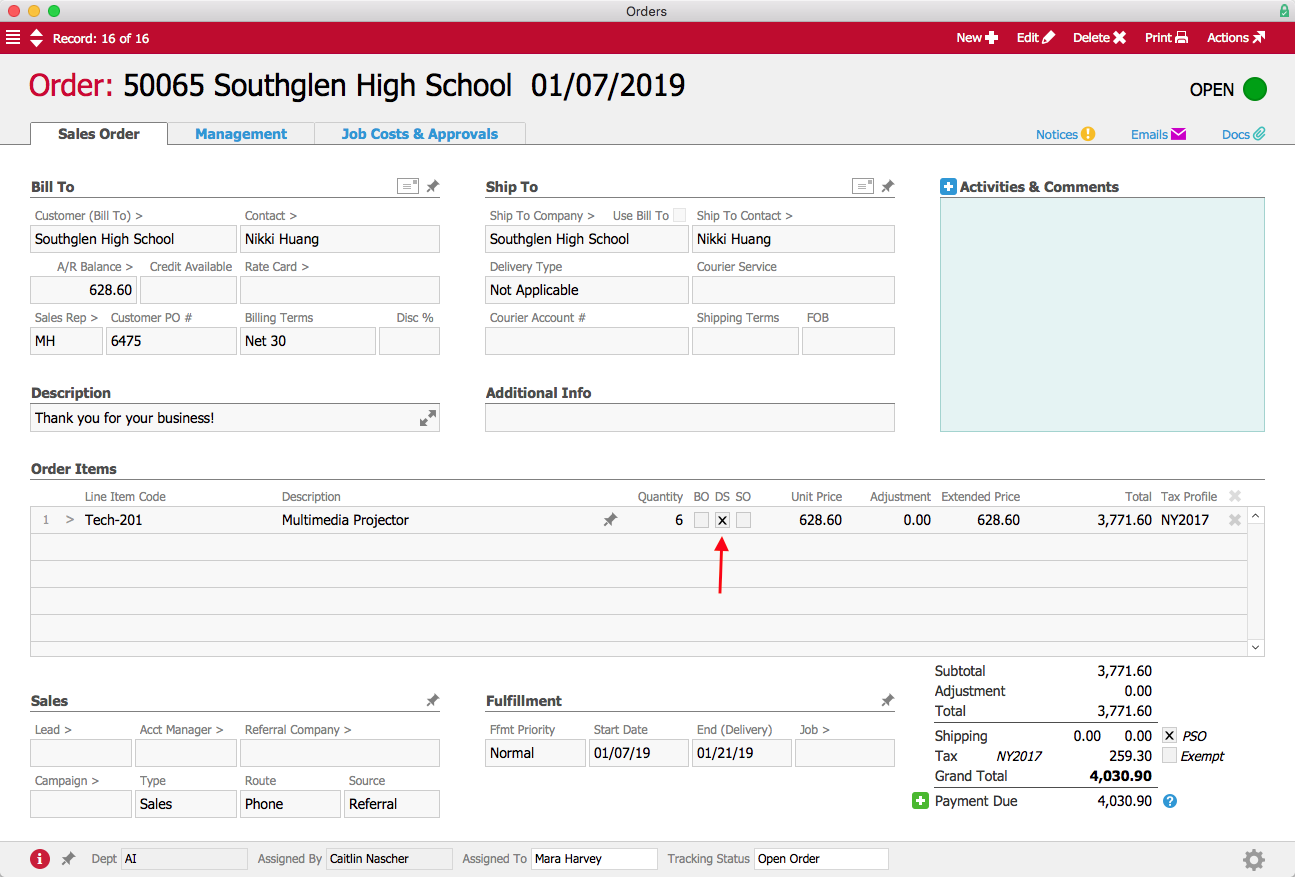
DS Order Annotated

When Mara opens the order, a purchase order is generated and a notice is sent to the Accounts Payable user group. Denise James in the A/P department reviews the purchase order and sends it to the vendor, Aperture Technologies. Unlike a typical purchase order, where the ship-to address would be an aACME warehouse, this PO will be shipped directly to the school. The Drop Ship flag is checked to indicate that the ship-to address belongs to the customer.
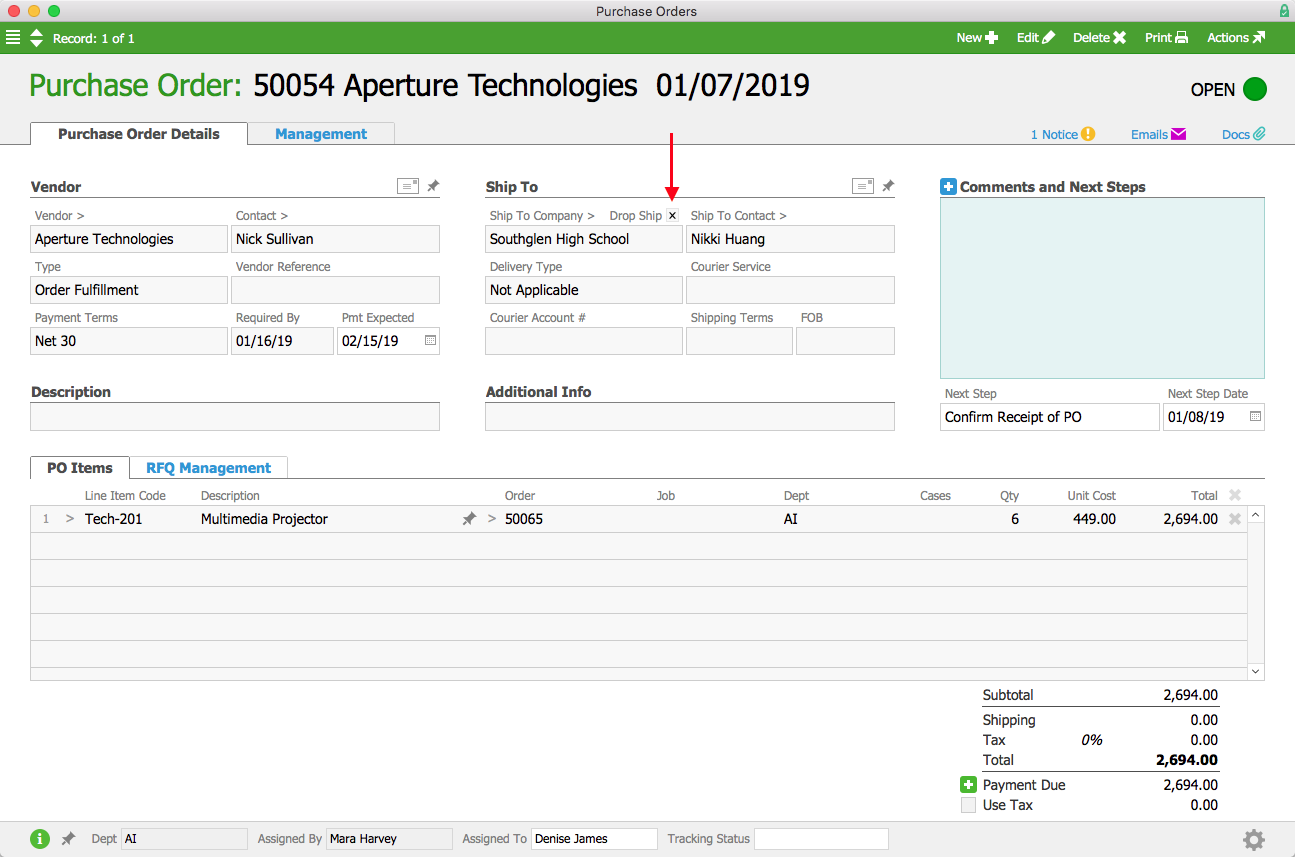
DS PO Annotated

A few days later, the vendor ships the order to the customer and sends a bill to aACME’s Accounts Payable department. When Denise enters the vendor’s bill, aACE automatically generates the customer invoice.

aACME wants all of their customers to have a good experience, so when they receive several complaints about drop shipments from Aperture Technologies arriving sloppily packaged, they quickly act to make sure those mistakes aren’t repeated. aACME manager Jason Dunn navigates to Aperture’s company record and checks the “Do not allow drop shipments flag” to prevent further orders from being shipped from this vendor directly to customers.
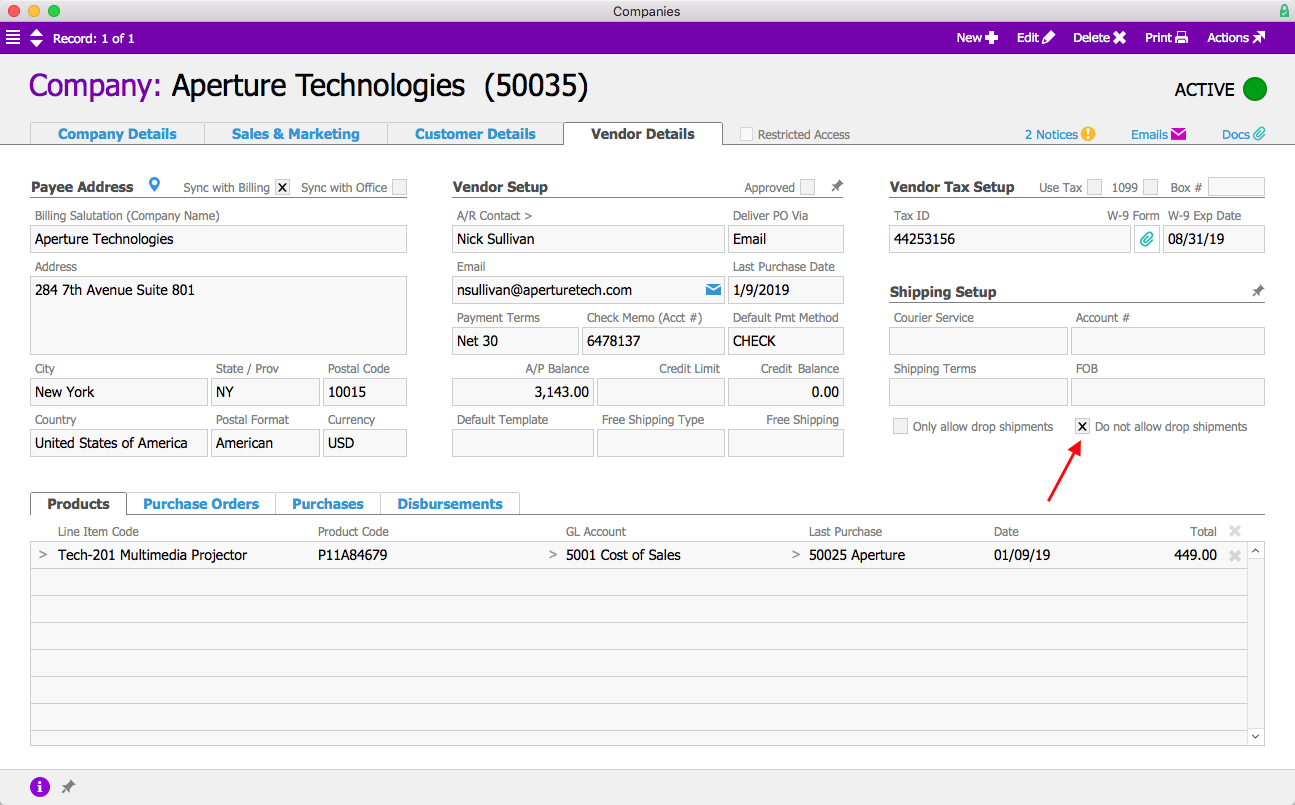
DS Company Record Annotated

Now when Mara enters an order for an Aperture Technologies product, if she tries to check the Drop Ship flag, she’ll get an error stating that the product cannot be drop shipped. Instead it will be sent to aACME’s warehouse as a special order, where it can be inspected and repackaged before being delivered to the customer.
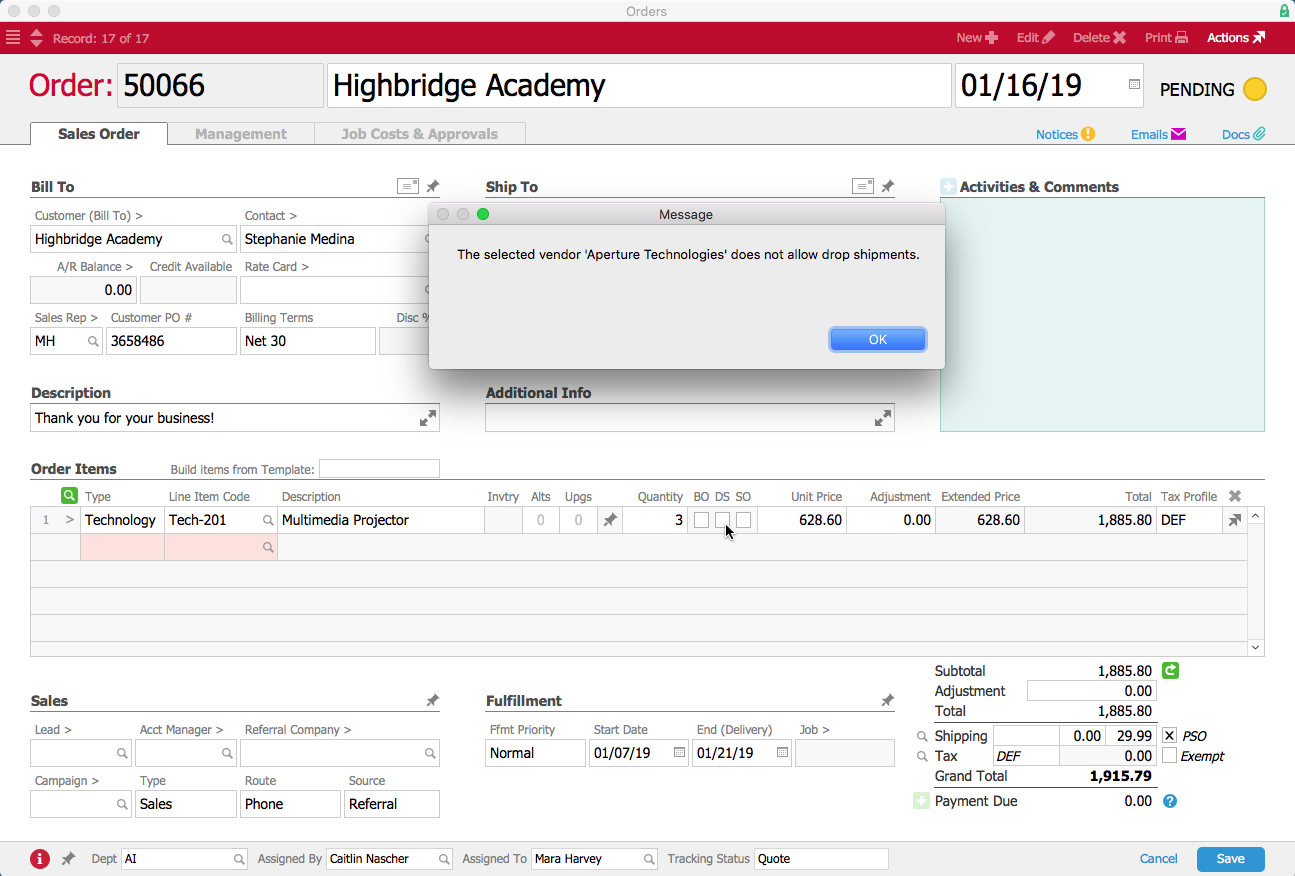
DS Order Error

Special Orders

aACME also sells scanners for electronically scoring multiple-choice tests, but since these items don’t sell quickly, aACME doesn’t typically keep them in stock on warehouse shelves. Instead the scanners are ordered on an as-needed basis. In the product’s record, the Special Order flag is checked, meaning that the product will be special ordered by default.
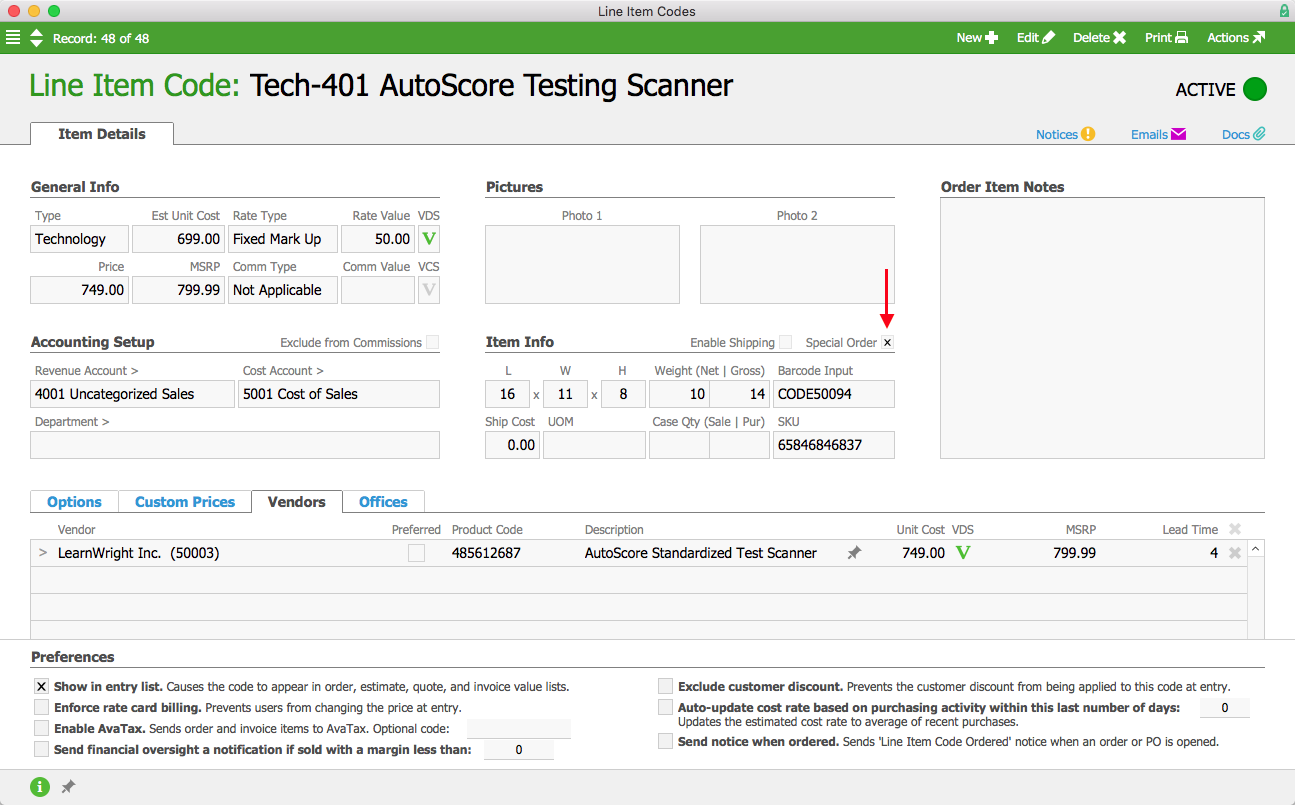
SO Line Item Code Annotated

When Mara Harvey receives an order for five of these scanners for the Brightside Charter School, she enters the order in aACE. The Special Order (“SO”) flag for the product is automatically checked since the product is flagged as Special Order. Products that aren’t normally special-ordered can also be flagged as special orders as necessary.
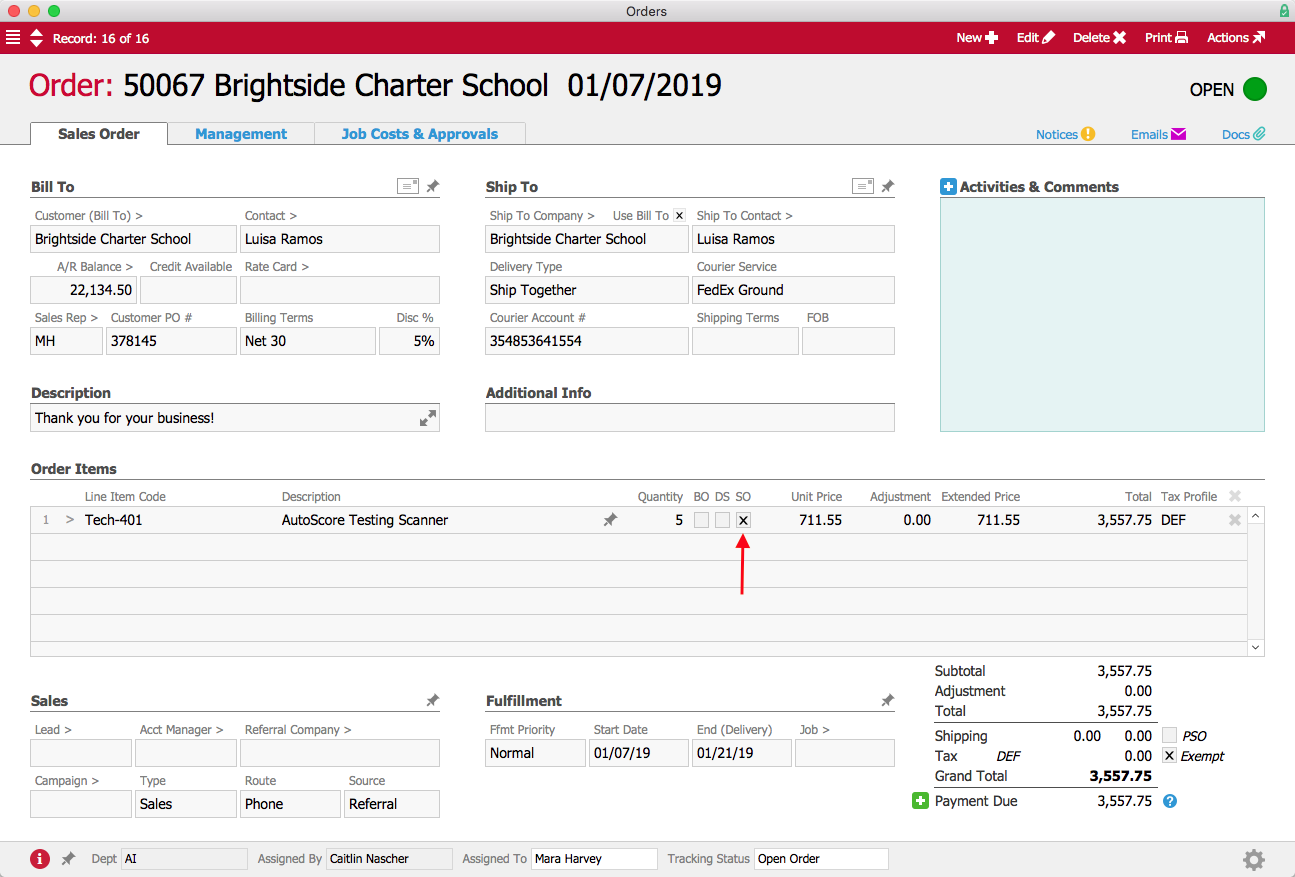
SO Order Annotated

When Mara processes the order, a purchase order is generated and a notice is sent to the Accounts Payable user group. Denise James again opens the purchase order and sends it to the vendor; this time, however, the Ship To address is one of aACME’s warehouses.
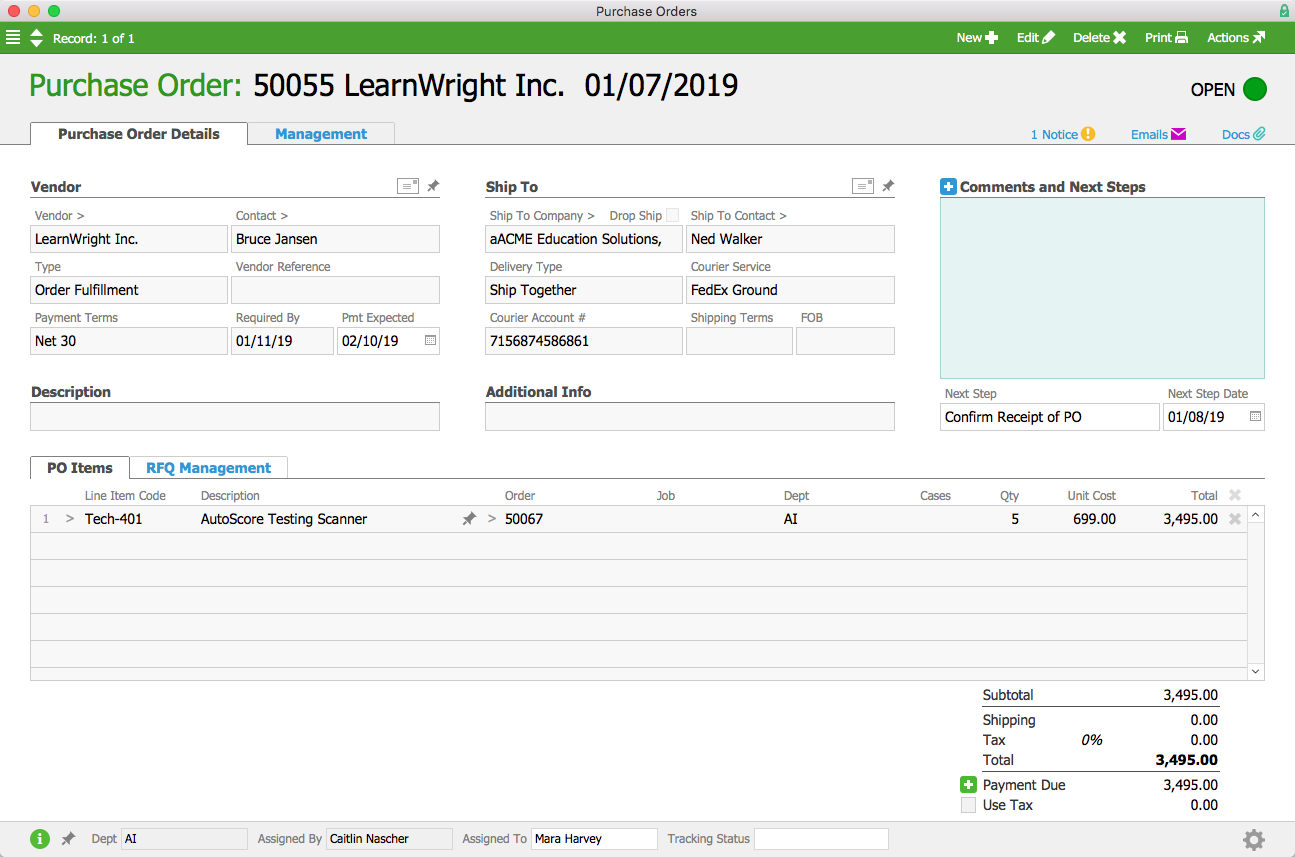
SO PO

A few days later, the shipment of scanners arrives from the vendor. When aACME employee Kristie Hernandez marks the shipment as received, a notice is sent to Mara so that she can come and inspect the goods. Additionally, aACE automatically generates a pending outgoing shipment to send the scanners to the Brightside Charter School. This pending shipment is also visible in the order’s Shipping screen.
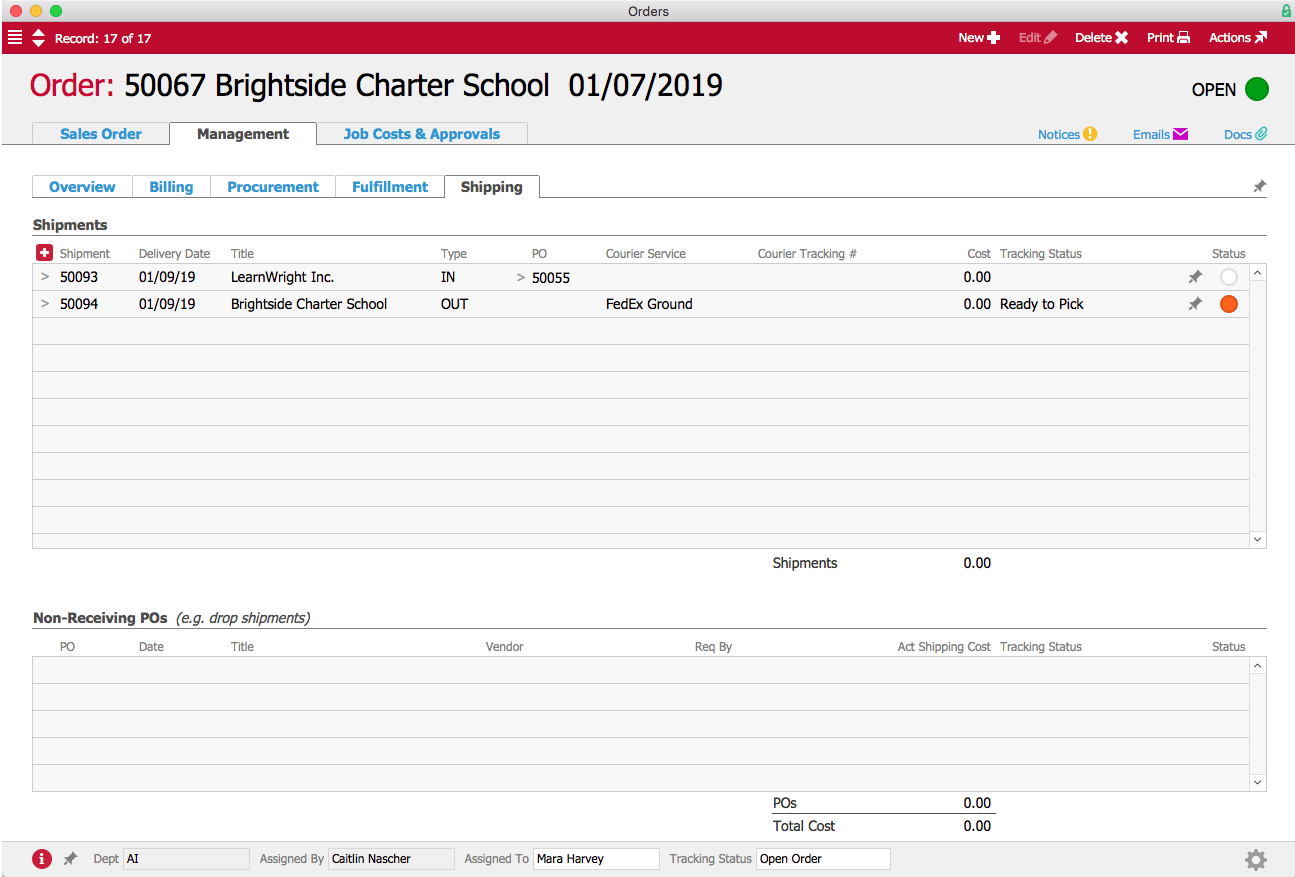
SO Shipments

Once Mara has approved the products, Kristie repackages the scanners and prepares them for delivery to the customer. When the shipment to the school is processed, aACE automatically generates the customer invoice.


aACE makes managing drop shipments and special orders easy and accurate by automating key aspects of the processes and reducing the need for manual data entry. Check out our customer success stories to learn what else aACE can do for your business.

Learn More
Drop shipping and special ordering allow you to offer a wide range of products to your customers without the overhead costs of storing and managing inventory. But tracking those sales in your business management solution can get complicated fast. Fortunately aACE offers robust features to automate... Learn More

-->

Drop shipping and special ordering allow you to offer a wide range of products to your customers without the overhead costs of storing and managing inventory. But tracking those sales in your business management solution can get complicated fast.

Fortunately aACE offers robust features to automate drop shipping and special ordering. To learn how aACE makes these workflows a snap, let’s take a look at how our fictional company, aACME Education Solutions, handles them in their day-to-day operations.

Drop Shipping

aACME sells multimedia projectors through their website, but they aren’t kept in stock at aACME’s warehouse. When Mara Harvey receives an order for six projectors from the Southglen High School, she enters the order in aACE and checks the Drop Ship (“DS”) flag for the product.

DS Order Annotated

When Mara opens the order, a purchase order is generated and a notice is sent to the Accounts Payable user group. Denise James in the A/P department reviews the purchase order and sends it to the vendor, Aperture Technologies. Unlike a typical purchase order, where the ship-to address would be an aACME warehouse, this PO will be shipped directly to the school. The Drop Ship flag is checked to indicate that the ship-to address belongs to the customer.

DS PO Annotated

A few days later, the vendor ships the order to the customer and sends a bill to aACME’s Accounts Payable department. When Denise enters the vendor’s bill, aACE automatically generates the customer invoice.

aACME wants all of their customers to have a good experience, so when they receive several complaints about drop shipments from Aperture Technologies arriving sloppily packaged, they quickly act to make sure those mistakes aren’t repeated. aACME manager Jason Dunn navigates to Aperture’s company record and checks the “Do not allow drop shipments flag” to prevent further orders from being shipped from this vendor directly to customers.

DS Company Record Annotated

Now when Mara enters an order for an Aperture Technologies product, if she tries to check the Drop Ship flag, she’ll get an error stating that the product cannot be drop shipped. Instead it will be sent to aACME’s warehouse as a special order, where it can be inspected and repackaged before being delivered to the customer.

DS Order Error

Special Orders

aACME also sells scanners for electronically scoring multiple-choice tests, but since these items don’t sell quickly, aACME doesn’t typically keep them in stock on warehouse shelves. Instead the scanners are ordered on an as-needed basis. In the product’s record, the Special Order flag is checked, meaning that the product will be special ordered by default.

SO Line Item Code Annotated

When Mara Harvey receives an order for five of these scanners for the Brightside Charter School, she enters the order in aACE. The Special Order (“SO”) flag for the product is automatically checked since the product is flagged as Special Order. Products that aren’t normally special-ordered can also be flagged as special orders as necessary.

SO Order Annotated

When Mara processes the order, a purchase order is generated and a notice is sent to the Accounts Payable user group. Denise James again opens the purchase order and sends it to the vendor; this time, however, the Ship To address is one of aACME’s warehouses.

SO PO

A few days later, the shipment of scanners arrives from the vendor. When aACME employee Kristie Hernandez marks the shipment as received, a notice is sent to Mara so that she can come and inspect the goods. Additionally, aACE automatically generates a pending outgoing shipment to send the scanners to the Brightside Charter School. This pending shipment is also visible in the order’s Shipping screen.

SO Shipments

Once Mara has approved the products, Kristie repackages the scanners and prepares them for delivery to the customer. When the shipment to the school is processed, aACE automatically generates the customer invoice.


aACE makes managing drop shipments and special orders easy and accurate by automating key aspects of the processes and reducing the need for manual data entry. Check out our customer success stories to learn what else aACE can do for your business.

Learn More

Read more about Streamline Your Shipping Process with aACE+ ReadyCloud

Streamline Your Shipping Process with aACE+ ReadyCloud

With aACE, you can.

The aACE+ ReadyCloud ReadyShipper integration significantly reduces the need for manual data entry, a common source of delays and costly errors. Our automated shipping integration passes information seamlessly between the two solutions, so it's a breeze to get deliveries to your customers on time. And when you receive a bill from a courier, aACE also makes it easy to reconcile that statement with your existing records. Here’s how:


Now that we’ve seen the shipping integration in action, let’s look at how the fictional company aACME Education Solutions uses it in their day-to-day operations.

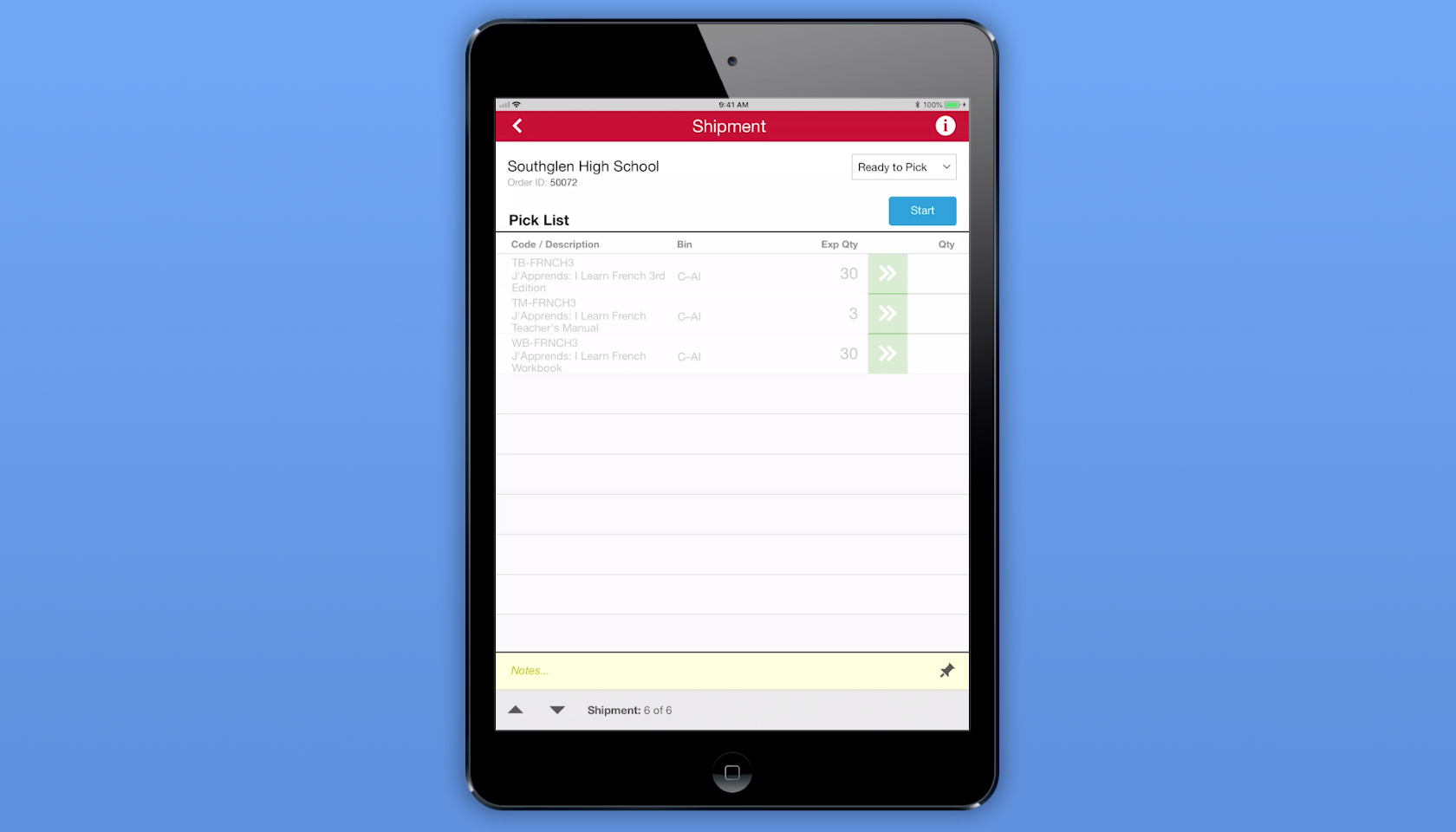
aACME customer Southglen High School places an order for 30 French textbooks, 3 of the corresponding teacher’s manuals, and 30 workbooks. As soon as the order is opened, aACE automatically generates a shipment with the tracking status Ready to Pick. The shipment is immediately passed to the aACE Pick app.

On the warehouse floor, aACME employee Ned Walker logs into the Pick app via a shared iPad. He chooses the Southglen High School shipment from a list of shipments that are ready to pick. In the shipment’s detail view, he sees each line item in the shipment, the bin where each line item is located, and the expected quantity of each item that he needs to pick. When Ned taps the Start button, the Pick app updates the shipment record’s tracking status to In Progress.

When Ned finishes picking the required textbooks, he enters the quantities of each item into the Pick app. When he’s finished with the shipment, he taps the Done button and the app updates the shipment’s tracking status to Ready to Transmit. From there, aACE automatically transmits the shipment to ReadyCloud.

Over in aACME’s Shipping Department, employee Kristie Hernandez packages the shipment. She then logs into ReadyCloud’s ReadyShipper terminal and schedules the packages for delivery. The shipment information is automatically pulled back into aACE, where the record is updated with cost and tracking information and the shipment’s tracking status is changed to Shipped. An invoice for the shipment is automatically generated — and all of this happens without Kristie ever needing to log into aACE.

Another source of frustration for companies like aACME is entering and reconciling courier bills. The aACE+ ReadyCloud integration makes this a snap. Drew Sanderson works in aACME’s Accounts Payable Department. Rather than manually entering the courier bill at the end of each month, Drew can see all of the shipments he hasn’t yet purchased at a glance with aACE’s Build Courier Invoice feature. With one click, Drew can organize each shipment, its costs, and its tracking information for easy line-by-line comparison with the courier’s statement.

What if the cost of a shipment on the courier’s bill doesn’t match the cost in aACE? For example, what if an address turned out to be residential instead of commercial? If Drew finds a discrepancy, he can easily adjust it in the purchase. That change automatically updates the shipment record, which in turn updates the order so the costs stay correct. To keep shipping costs in check, his aACE solution is configured to automatically send notifications to an oversight group if the difference between the courier’s bill and the shipment cost in aACE exceeds a certain value or percentage.

For a company like aACME with hundreds of shipments per day, this automation saves hours of labor and keeps the fulfillment process running smoothly. To learn more about this feature or find out what else aACE can do for your business, contact us today.

"The more we use this program, the more we love it! The biggest asset to our company has been the automated workflows, especially in our customer care and shipping departments. We have been able to reduce order entry errors and drastically improve our ship time from order entry to out-the-door. The shipping integration has helped reduce picking errors and assist in a speedy pick and pack process." - Daniel Chapman, Founder and CEO, Redd Remedies


Learn More

A key to success for any business is getting your customers what they want, when they want it. This means your fulfillment process is crucial. But as your company grows, you may find that shipping solutions that don’t talk to your ERP system are grinding your fulfillment process to a halt as... Learn More

-->

A key to success for any business is getting your customers what they want, when they want it. This means your fulfillment process is crucial. But as your company grows, you may find that shipping solutions that don’t talk to your ERP system are grinding your fulfillment process to a halt as employees manually copy information from one system to the other. Wouldn’t it be great if you could speed up your fulfillment process and improve accuracy?

With aACE, you can.

The aACE+ ReadyCloud ReadyShipper integration significantly reduces the need for manual data entry, a common source of delays and costly errors. Our automated shipping integration passes information seamlessly between the two solutions, so it's a breeze to get deliveries to your customers on time. And when you receive a bill from a courier, aACE also makes it easy to reconcile that statement with your existing records. Here’s how:


Now that we’ve seen the shipping integration in action, let’s look at how the fictional company aACME Education Solutions uses it in their day-to-day operations.

aACME customer Southglen High School places an order for 30 French textbooks, 3 of the corresponding teacher’s manuals, and 30 workbooks. As soon as the order is opened, aACE automatically generates a shipment with the tracking status Ready to Pick. The shipment is immediately passed to the aACE Pick app.

On the warehouse floor, aACME employee Ned Walker logs into the Pick app via a shared iPad. He chooses the Southglen High School shipment from a list of shipments that are ready to pick. In the shipment’s detail view, he sees each line item in the shipment, the bin where each line item is located, and the expected quantity of each item that he needs to pick. When Ned taps the Start button, the Pick app updates the shipment record’s tracking status to In Progress.

When Ned finishes picking the required textbooks, he enters the quantities of each item into the Pick app. When he’s finished with the shipment, he taps the Done button and the app updates the shipment’s tracking status to Ready to Transmit. From there, aACE automatically transmits the shipment to ReadyCloud.

Over in aACME’s Shipping Department, employee Kristie Hernandez packages the shipment. She then logs into ReadyCloud’s ReadyShipper terminal and schedules the packages for delivery. The shipment information is automatically pulled back into aACE, where the record is updated with cost and tracking information and the shipment’s tracking status is changed to Shipped. An invoice for the shipment is automatically generated — and all of this happens without Kristie ever needing to log into aACE.

Another source of frustration for companies like aACME is entering and reconciling courier bills. The aACE+ ReadyCloud integration makes this a snap. Drew Sanderson works in aACME’s Accounts Payable Department. Rather than manually entering the courier bill at the end of each month, Drew can see all of the shipments he hasn’t yet purchased at a glance with aACE’s Build Courier Invoice feature. With one click, Drew can organize each shipment, its costs, and its tracking information for easy line-by-line comparison with the courier’s statement.

What if the cost of a shipment on the courier’s bill doesn’t match the cost in aACE? For example, what if an address turned out to be residential instead of commercial? If Drew finds a discrepancy, he can easily adjust it in the purchase. That change automatically updates the shipment record, which in turn updates the order so the costs stay correct. To keep shipping costs in check, his aACE solution is configured to automatically send notifications to an oversight group if the difference between the courier’s bill and the shipment cost in aACE exceeds a certain value or percentage.

For a company like aACME with hundreds of shipments per day, this automation saves hours of labor and keeps the fulfillment process running smoothly. To learn more about this feature or find out what else aACE can do for your business, contact us today.

"The more we use this program, the more we love it! The biggest asset to our company has been the automated workflows, especially in our customer care and shipping departments. We have been able to reduce order entry errors and drastically improve our ship time from order entry to out-the-door. The shipping integration has helped reduce picking errors and assist in a speedy pick and pack process." - Daniel Chapman, Founder and CEO, Redd Remedies


Learn More

Scroll to Top